Google has introduced a range of new features designed to enhance user account security, privacy, and protection from scams. These updates aim to make it easier for users to recover their accounts, safeguard personal data, and defend against malicious online threats. Below, we'll walk you through these new features, explaining how they work and how you can take full advantage of them to improve your overall online experience.
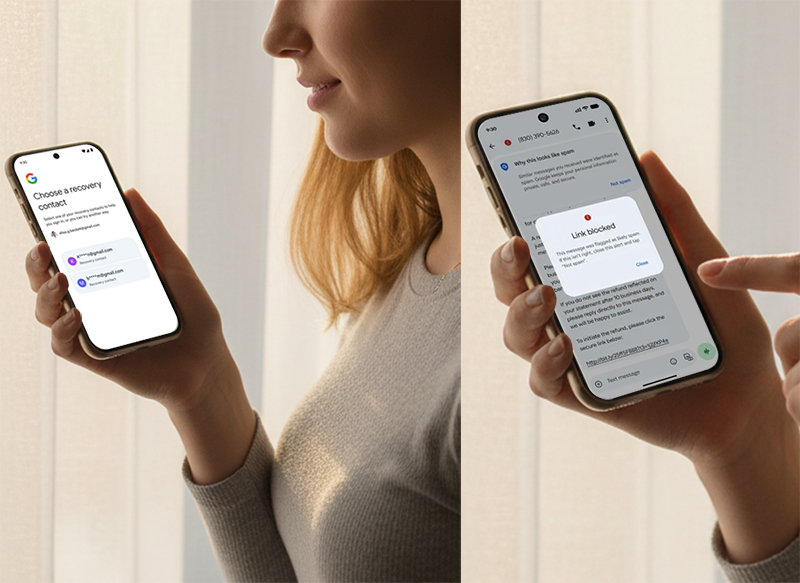
What Is Google's Recovery Contacts Feature?
Google's Recovery Contacts feature allows you to add trusted friends or family members as contacts to help you recover your account if you lose access or forget your password.
How Recovery Contacts Work:
Add Up to 10 Contacts: You can add 10 trusted contacts to assist with recovery.
Approval Process: Your contacts must approve your request before they are added.
Temporary Verification Code: If you are locked out of your account, your recovery contact will receive a one-time code, valid for 15 minutes, which you will use to verify your identity.
Seven-Day Lockout: After a contact helps with recovery, they cannot be used again for seven days.
This feature is particularly useful for those who might lose access to their devices or forget their passwords, providing an extra layer of recovery security.
How to Set Up Recovery Contacts
Setting up Recovery Contacts is straightforward and can be done in a few simple steps.
Steps to Set Up Recovery Contacts:
Open your Google Account settings.
Go to the Security tab.
Under Account Recovery, select Recovery Contacts.
Add your trusted contacts and wait for their approval.
Once set up, you can easily recover your account by using your contacts in case you lose access.
How to Use Phone Number for Account Recovery
Google now allows you to use your phone number as an additional method for account recovery, which is especially useful if you lose your device.
How It Works:
Automatic Detection of Linked Accounts: Google will automatically detect all accounts associated with your phone number.
Verification via Lock Screen: You can verify your identity by using your lock-screen passcode or pattern from your previous device.
Benefits of Using Phone Number for Recovery:
Fast Recovery: Quickly recover your account even if you lose your device.
Global Rollout: This feature is gradually being rolled out to all users worldwide.
This method adds a convenient way to recover your account and is perfect for users who may not have access to recovery emails or contacts.
How to Enable Key Verifier for Encrypted Messages
For users with Android 10 or later, Google has added a key verifier tool in Google Messages to ensure that your messages are end-to-end encrypted and remain private.
How Key Verifier Works:
QR Code Verification: Users can scan a QR code to verify the identity of the contact they're communicating with.
Ensures Message Privacy: This tool ensures that your messages are encrypted and can only be read by you and the recipient.
Why It's Important:
Enhanced Privacy: The key verifier helps ensure that your messages are secure and private.
Secure Communication: It verifies that your communication is with the intended recipient, preventing unauthorized access.
This new feature ensures that your messages are private and protected from third-party interference.
How to use the "Be Scam Ready" game to raise awareness of scams
Google has launched an interactive game called "Be Scam Ready" to help users learn how to identify common scams and provide information on how to prevent them.
What You'll Learn:
Scam Identification: Learn how to recognize common scams like phishing, fraudulent job offers, and fake financial schemes.
Practical Tips: The game provides actionable advice on how to avoid falling victim to scams and fraud.
Interactive Learning: Through interactive gameplay, users can easily learn how to protect their personal information.
Why This Game Is Important:
Raise Awareness: It helps users become more aware of the scams they might encounter online.
Enhance Security Knowledge: By playing the game, users can improve their ability to identify scams and protect themselves.
This initiative is part of Google's broader effort to improve digital literacy and online safety for all users.
How to protect yourself from spam links
To protect users from phishing and scam messages, Google Messages has introduced a spam link detection feature that automatically identifies and blocks malicious links.
How the spam link detection feature works:
Spam link warning: When you click a suspicious link in a message, Google Messages will warn you that the link might be malicious and block you from accessing the page.
Automatic blocking: Suspicious links are automatically blocked, helping you avoid visiting malicious websites.
How to protect yourself:
Real-time blocking: Google Messages scans message content in real time to identify potentially malicious links.
Reduce security risks: This feature can effectively reduce the spread of phishing attacks and malware.
With the increase in SMS phishing attacks, this new feature is particularly important. It can help you react immediately and avoid being affected when you accidentally click on a fraudulent link.
Why You Should Use These New Features
With the growing risks of online threats, Google's new tools are essential for protecting your privacy and account security. Here's why you should use them:
Recovery Contacts: Safely recover your account with the help of trusted contacts.
Phone Number Sign-In: Quickly restore access to your account using your phone number.
Key Verifier: Secure your messages with end-to-end encryption and verify the identity of your contacts.
Be Scam Ready Game: Educate yourself on how to spot and avoid online scams.
By taking advantage of these features, you can ensure your accounts and personal information are secure from threats and easily recoverable in case of an emergency.
Final Thoughts
Google's latest updates offer a range of privacy and security tools to help users protect their accounts and personal data. Here's a quick summary of the key features:
Recovery Contacts for easy account recovery.
Phone Number Sign-In for faster account access.
Key Verifier to ensure encrypted and secure messaging.
Be Scam Ready Game to educate users on online fraud.
Make sure to enable these features in your Google Account settings to enjoy a safer online experience. As digital threats continue to evolve, these tools will help you stay ahead of potential risks and keep your accounts secure.



