Spotify has taken its AI DJ feature to the next level with a significant update that allows you to send requests via text, alongside the already existing voice command option. This change is sure to appeal to those who prefer typing their requests, especially when in environments where speaking out loud may not be ideal, like during commutes or in quiet public spaces.
In this guide, we'll walk you through the new capabilities of Spotify's AI DJ and how to make the most of them. Whether you're a Premium subscriber or just curious about the feature, here's everything you need to know.
Key Updates to Spotify's AI DJ Feature
Spotify's AI DJ isn't just a simple playlist generator; it's a dynamic, interactive tool that now comes with some exciting new features:
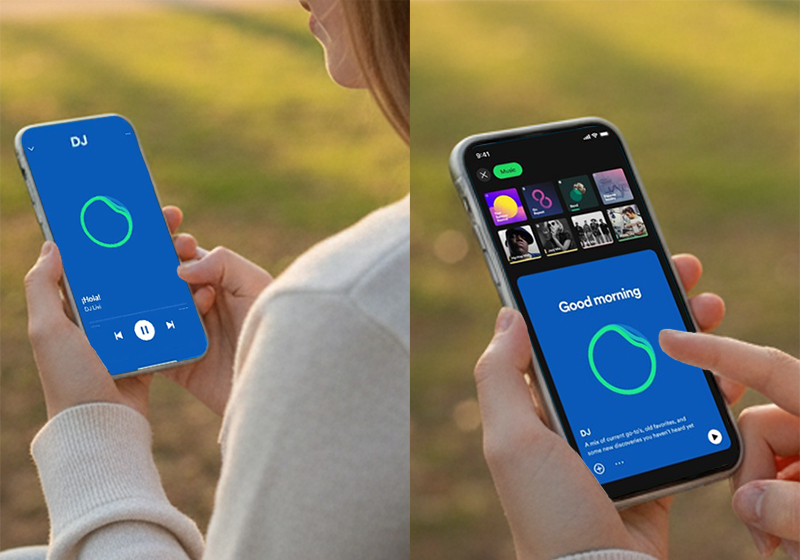
Text Input for Requests: You can now send music requests via text, making it perfect for situations where voice commands are inconvenient or impractical.
Support for English and Spanish: The AI DJ can now understand requests in both English and Spanish, including a new Spanish-language DJ, "DJ Livi."
Personalized Prompt Suggestions: Not sure what you want to listen to? The AI DJ now offers suggestions to help you decide, ensuring a smoother and more engaging music experience.
How to Access and Use the AI DJ Feature
Using Spotify's AI DJ is simple. Here's how to access and start using the feature:
Search for "DJ" on Spotify:
Open the Spotify app and type "DJ" into the search bar. Once you find the AI DJ, tap play to start listening to a personalized playlist curated just for you.
Send Requests via Text or Voice:
Once the music is playing, tap the DJ button located at the bottom-right of your screen. You can then either speak a voice command or type a text request to change the music.
Personalized Suggestions:
If you're unsure about what to listen to next, the AI DJ will provide you with prompt suggestions based on your preferences. This feature helps you discover new music effortlessly.
When Should You Use Text Input for Spotify's AI DJ?
Text input can be a game-changer in certain situations. Here are some scenarios where typing your request is more convenient than speaking:
In Quiet Spaces: If you're in a library, café, or any public place where speaking might disturb others, typing your request is the perfect solution.
On-the-Go: Whether you're on public transportation or in the gym, texting is more discreet and easier than speaking aloud.
Avoiding Attention: In noisy environments or when you need to be discreet, text input ensures your requests are received without having to raise your voice.
Spotify's AI DJ: Handling Complex Requests
Spotify's AI DJ is designed to handle complex, multi-faceted music requests. Here's what you can ask it to do:
Genre + Mood: Example: "Play energetic pop music for a workout."
Artist + Activity: Example: "Can you play relaxing jazz by Miles Davis for studying?"
Activity + Mood: Example: "Give me some calming music for meditation."
The ability to combine multiple factors allows for a highly customized listening experience, ensuring that the music matches your specific mood or activity.
Global Availability and Future Updates
The AI DJ feature is currently available in over 60 markets worldwide and supports both English and Spanish. With the growing popularity of AI-driven music services, it's expected that Spotify will expand language support and continue enhancing the AI DJ's capabilities in the future.
Global Reach: Over 60 markets currently support this feature, with more languages likely to be added soon.
Ongoing Improvements: Spotify is expected to introduce further updates, such as enhanced algorithms and integrations with other apps or devices.
Why You Should Try Spotify's AI DJ
Spotify's AI DJ feature offers a personalized music experience like no other. Here's why you should give it a try:
Personalized Playlists: The AI DJ curates playlists based on your listening habits, offering a unique and dynamic experience.
Convenience: You can interact with the AI DJ using both text and voice commands, allowing for greater flexibility and ease of use.
Music Discovery: With personalized suggestions and the ability to combine different music factors, the AI DJ makes it easier to discover new songs that match your mood, activity, and preferences.
Final Thoughts
Spotify's latest update to the AI DJ feature is a major leap forward in how we interact with music. By adding text input alongside voice commands, Spotify is making it easier for users to enjoy personalized music without disruption, no matter where they are.
Whether you're at home, commuting, or in a quiet space, the AI DJ is designed to fit into your routine seamlessly. With its ability to handle complex music requests, suggest new songs, and support multiple languages, the AI DJ offers an experience that feels tailored just for you.
If you haven't yet tried Spotify's AI DJ, now is the perfect time to dive in. Take advantage of the new text input feature, explore different music requests, and enjoy a curated listening experience that's unique to your tastes.



