WhatsApp has officially rolled out a brand-new update that introduces AI-generated backgrounds for video calls. Alongside this feature, the app now also includes a range of preset filters and effects, giving users more creative options to customize their video chat experience.
With this update, Meta is taking another step toward integrating generative AI across its ecosystem, bringing WhatsApp closer in line with Instagram and Messenger. Whether you want to appear on a tropical beach, in a stylish office, or in a completely imaginary scene, AI-generated backgrounds make it possible with just a few taps.
This article will walk you through the details of this new feature, how to use it, the benefits it offers, and what it means for the future of communication on WhatsApp.
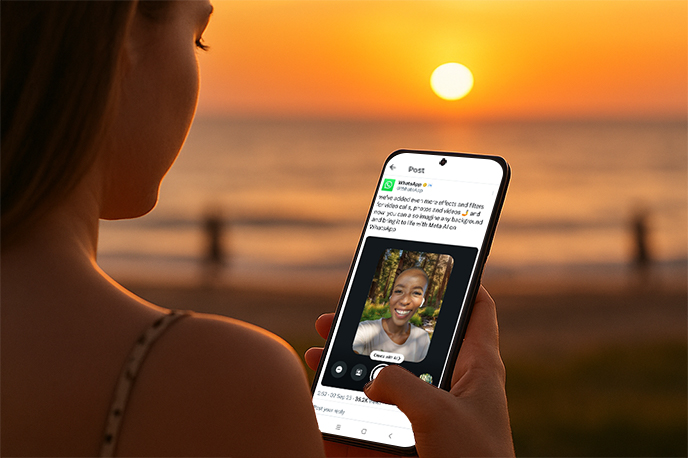
Key Highlights of WhatsApp's AI Background Feature
AI-Powered Virtual Scenes
By typing in a simple prompt, you can generate custom backgrounds instantly. For example, typing "sunset at the beach" or "modern office space" allows WhatsApp's AI to create a unique virtual environment.Preset Filters and Backgrounds
If you don't want to generate your own, WhatsApp includes several built-in options such as beaches, forests, city skylines, and cafés, which can be applied with one click.Deeper Personalization
This update builds on WhatsApp's earlier chat themes feature, which lets users customize chat bubbles and in-app backgrounds. Now, with AI video backgrounds, personalization extends to live video calls.Seamless Integration
There's no need for third-party apps—everything is built directly into WhatsApp. Once enabled, the background change is applied instantly during your video call.
How to Use AI Backgrounds in WhatsApp Video Calls
Follow these simple steps to try the new feature:
Update WhatsApp
Make sure your app is running the latest version on iOS or Android.Start a Video Call
Open a call with a friend, family member, or group.Access Filters and Effects
Tap the "Filters/Effects" button on the call screen.Choose Your Background
Select one of WhatsApp's preset backgrounds; or
Enter a prompt and let AI generate a customized scene.
Apply and Enjoy
Once chosen, the new background will instantly appear in your video call.
Why Is Meta Adding AI Backgrounds to WhatsApp?
Enhanced User Experience: Adding more customization makes video calls engaging and fun, helping users feel more connected.
Professional Utility: With remote work on the rise, virtual office environments can help users maintain a professional look, even in casual settings.
Competitive Edge: Zoom and Google Meet have long supported virtual backgrounds. WhatsApp is catching up, but with the added twist of AI generation.
Meta's AI Strategy: This rollout aligns with Meta's broader push to bring generative AI to all its apps, from Instagram avatars to Messenger chatbots.
Practical Use Cases
Entertainment & Fun
Add playful or imaginative backgrounds when chatting with friends or family.Professional Meetings
Create clean, minimal, or corporate-style backdrops for a more professional presence during work calls.Privacy Protection
AI backgrounds can mask your real surroundings, keeping your home environment private.Content Creation
This feature could soon extend to WhatsApp Status updates, helping creators make more engaging videos and photos.
Pros and Cons of WhatsApp AI Backgrounds
AdvantagesOffers unique personalization options.
Ideal for both casual and professional communication.
Improves privacy by hiding real surroundings.
Creates an engaging user experience.
Limitations
Feature rollout is gradual—some users may not have access yet.
Requires modern devices with good processing power.
Overuse of virtual backgrounds could feel artificial or distracting.
What's Next for WhatsApp AI Features?
Meta is unlikely to stop here. Based on recent trends, we can expect more AI-powered updates in WhatsApp, such as:
Dynamic AI Backgrounds: Animated, moving backgrounds for a more immersive experience.
Smart Suggestions: AI recommending backgrounds based on call context.
Cross-App Integration: Shared AI assets across WhatsApp, Instagram, and Messenger.
AI Productivity Tools: Combining AI backgrounds with features like real-time captions, meeting notes, or live translation.
Final Thoughts
The launch of AI-generated backgrounds in WhatsApp video calls reflects Meta's strong commitment to integrating generative AI across its platforms. While some may see it as a fun, optional feature, it also has real utility for privacy, professionalism, and creative expression.
For users, the best part is the flexibility: whether you want to entertain friends with a playful background, hide clutter in your room, or present yourself in a professional setting, this update makes it possible.
So, if you haven't already, update your WhatsApp app and try switching to an AI background in your next video call—you might find it's more useful than you expect.



