TikTok has introduced a fresh set of social features designed to make it easier for users to stay connected, discover content together, and interact more meaningfully inside the app. The update includes a Shared Feed, Shared Collections, and new seasonal greeting cards delivered through DMs.
These additions aim to strengthen private interactions—an area where platforms like Instagram have already seen massive engagement growth. Below is a detailed look at what the features do and how to use them, along with practical tips to help creators, brands, and everyday users get the most out of them.
1. What Is TikTok's Shared Feed?
TikTok's Shared Feed is a new personalized content stream designed for two people. Instead of giving both users their own individual For You pages, TikTok generates a curated list of videos based on the intersecting interests of both accounts.
TikTok has introduced a fresh set of social features designed to make it easier for users to stay connected, discover content together, and interact more meaningfully inside the app. The update includes a Shared Feed, Shared Collections, and new seasonal greeting cards delivered through DMs.
These additions aim to strengthen private interactions—an area where platforms like Instagram have already seen massive engagement growth. Below is a detailed look at what the features do and how to use them, along with practical tips to help creators, brands, and everyday users get the most out of them.
1. What Is TikTok's Shared Feed?
TikTok's Shared Feed is a new personalized content stream designed for two people. Instead of giving both users their own individual For You pages, TikTok generates a curated list of videos based on the intersecting interests of both accounts.
TikTok explains that this feature helps two people stay connected through a daily set of 15 recommended videos, ranging from sports clips to beauty tips or seasonal content—depending on what both users typically like or engage with.
Why It Matters
Encourages more DM-based sharing
Creates a mini "For You Page" for two users
Mimics Instagram's Blend, but designed specifically for short-form video behavior
Helps people discover content together, not separately
2. How to Use the Shared Feed on TikTok
Although TikTok is still rolling the feature out, here's what you can expect once it appears in your app:
Step-by-Step Guide
Open TikTok and go to your inbox
The Shared Feed lives inside private chats.
Select the chat with the person you want to share the feed with
TikTok will pair you with one user at a time.
Look for the "Shared Feed" prompt
This usually appears at the top of the chat window.
Start browsing your daily selection of 15 videos
These videos refresh every day.
React, comment, or send videos inside the chat
Engagement inside the Shared Feed makes the recommendations smarter.
Who Should Use It?
Couples and close friends
Families who enjoy discovering content together
Creators collaborating on trends
Influencers seeking DM-driven engagement
Brands maintaining close relationships with loyal customers
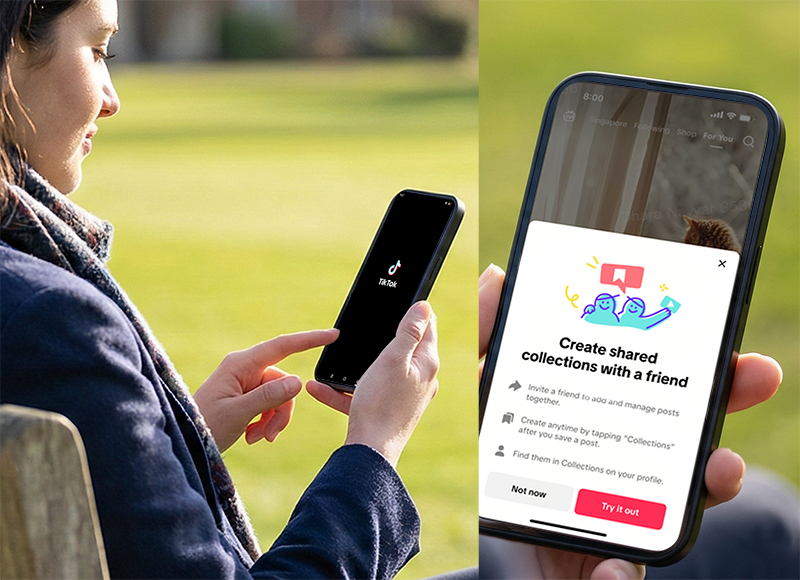
3. What Are TikTok's Shared Collections?
Shared Collections are collaborative folders where two or more users can save TikTok videos into a shared list.
Think of them as Pinterest-style boards, but specifically for TikTok videos.
Use Cases
Planning a room makeover
Collecting Christmas gift ideas
Saving recipes to cook together
Organizing study resources
Group inspiration boards for creators
Shared skill-learning playlists
4. How to Create and Use a Shared Collection
Step-by-Step Tutorial
Find a video you want to save
Tap Save or the bookmark icon
Choose Create Shared Collection
Add a name (e.g., "Holiday Ideas," "DIY Projects”)
Select one or more friends to collaborate with
Everyone can now add videos to the same folder
Tips for Better Organization
Use clear folder names
Create multiple collections for easier browsing
Pin important collections inside your chat
Add seasonal or project-based collections for quick access
5. TikTok's New Greeting Cards in DMs
TikTok is also adding seasonal greeting cards that open with animated effects. These cards can be sent directly through private messages.
How They Work
Open Inbox
Select a friend
Tap Send Greeting Card
Choose a seasonal template
Add a personal message
Send and watch the animation open on their screen
This feature is especially useful during holiday periods when users naturally share celebratory messages.
6. Are These Features Useful?
While none of these tools reinvent the wheel, they all serve TikTok's broader direction:
Strengthening private, intimate interactions inside the app.
Today's users often share TikToks and Reels privately instead of posting them publicly. TikTok's new features directly support that shift—making the app feel more personal, collaborative, and socially meaningful.
Whether these functions become widely adopted depends on user habits, but they offer new ways to build connection beyond the main For You feed.
7. Best Practices for Creators and Brands
If you're a creator, influencer, or business, here's how to take advantage of the updates:
Optimize for Shared Feeds
Make short, high-impact videos that appeal to multiple interests
Create videos that spark conversation or reactions
Lean into niche communities that are often shared between friends
Create Collection-Friendly Content
Videos that work well in Shared Collections:
Use Greeting Cards for Community Engagement
Send holiday cards to loyal fans
Create seasonal greetings in your brand voice
Encourage your audience to use greeting cards to share your video
Final Thoughts
TikTok's new Shared Feed, Shared Collections, and greeting card options reflect the platform's growing focus on private, meaningful interactions. These tools give users more ways to stay connected and offer creators and brands fresh opportunities to build engagement inside DMs.
As TikTok continues to evolve, these features may play a key role in how people discover and share videos together—making the platform more interactive and socially engaging than before.



