Xiaohongshu, a popular social media and e-commerce platform, offers users a unique combination of lifestyle sharing and online shopping. If you're looking to join this dynamic community, here’s a step-by-step guide on how to register and get started on Xiaohongshu.
Step 1: Download the App
For iOS Users: Open the App Store on your iPhone or iPad. Search for "小红书" or "Xiaohongshu" and tap on the app in the results. Click the “Download” or “Get” button.
For Android Users: Open the Google Play Store on your Android device. Search for "小红书" or "Xiaohongshu" and select the app from the list. Tap on the “Install” button.
Step 2: Open the App and Choose Language
Launch the App: Once downloaded, open the Xiaohongshu app on your device.
Select Language: If the app defaults to Chinese and you need English, look for a language selection option, often displayed as "语言" or "Language" in the app settings. Switch to English or your preferred language.
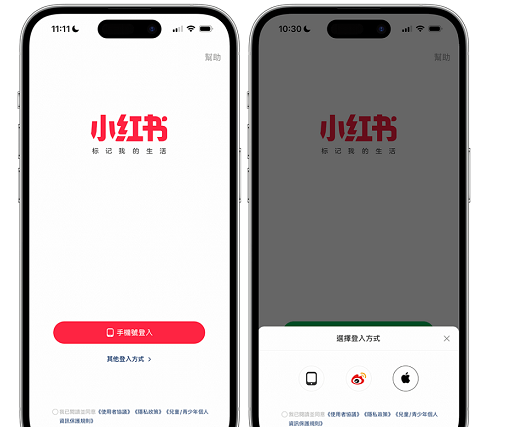
Step 3: Create an Account
Sign Up Options: You will have the option to sign up using your phone number, email address, or a social media account (such as WeChat, Facebook, or Apple ID). Choose your preferred method.
Phone Number/Email: Enter your phone number or email address. If you’re using a phone number, remember to select your country code from the dropdown menu. Click "Next" or “Continue”.
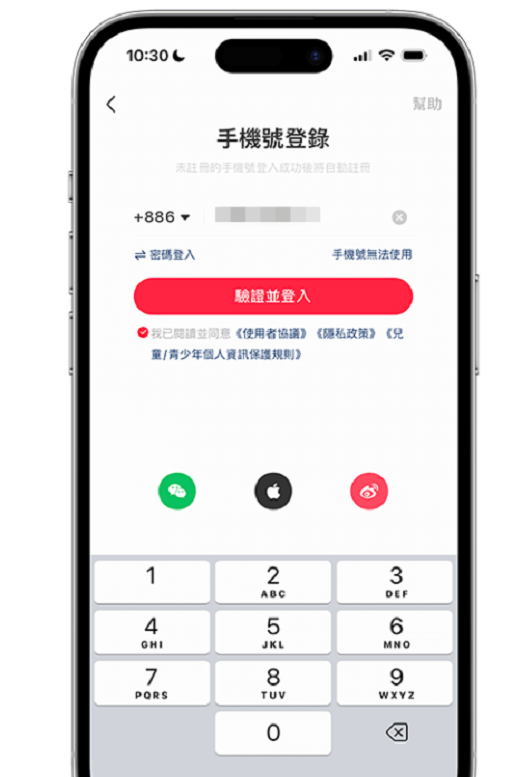
Verification Code: If you signed up with a phone number, you will receive a verification code via SMS. Enter the code in the app to verify your phone number. If you used an email address, check your inbox for a verification email and follow the instructions to confirm your email.
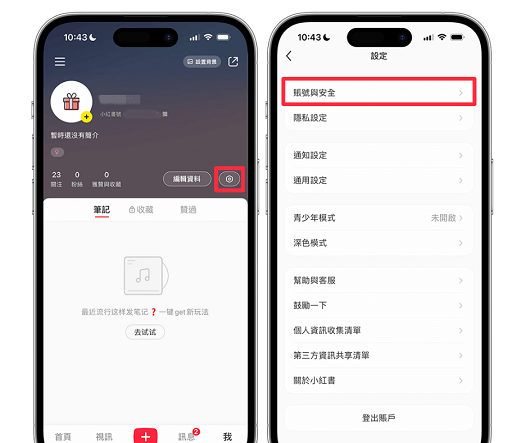
Step 4: Set Up Your Profile
Username: Choose a unique username for your profile. This will be your identity on the platform.
Profile Picture: Upload a profile picture by clicking on the photo icon. You can choose to take a new photo or upload one from your gallery.
Basic Information: Add any additional details such as your bio, location, and interests to complete your profile. This helps others learn more about you and enhances your visibility on the app.
Step 5: Explore and Follow
Follow Interests: Xiaohongshu will prompt you to follow topics or users that interest you. Doing so will help tailor your feed to your preferences.
Explore Content: Browse through the various categories and discover posts, videos, and products that appeal to you. Engage with the community by liking, commenting, and sharing posts.
Step 6: Start Posting
Create a Post: To share your own content, click on the “+” icon often found at the bottom center of the screen. Choose from options like photo, video, or text post.
Add Details: Write a catchy title or caption, tag relevant products or locations, and use hashtags to increase the visibility of your post.
Publish: Once you’re satisfied with your post, click on the “Publish” or “Post” button to share it with the Xiaohongshu community.
Tips for New Users
Engage Actively: Interact with other users by liking, commenting, and following their profiles. This helps build a strong community network.
Explore Features: Take time to explore the app’s various features, including its e-commerce section where you can shop for products directly from the app.
Stay Updated: Follow Xiaohongshu newsletters or updates to stay informed about new features, promotions, and community guidelines.
By following these steps, you'll be well on your way to enjoying all that Xiaohongshu has to offer. Happy exploring and sharing!



