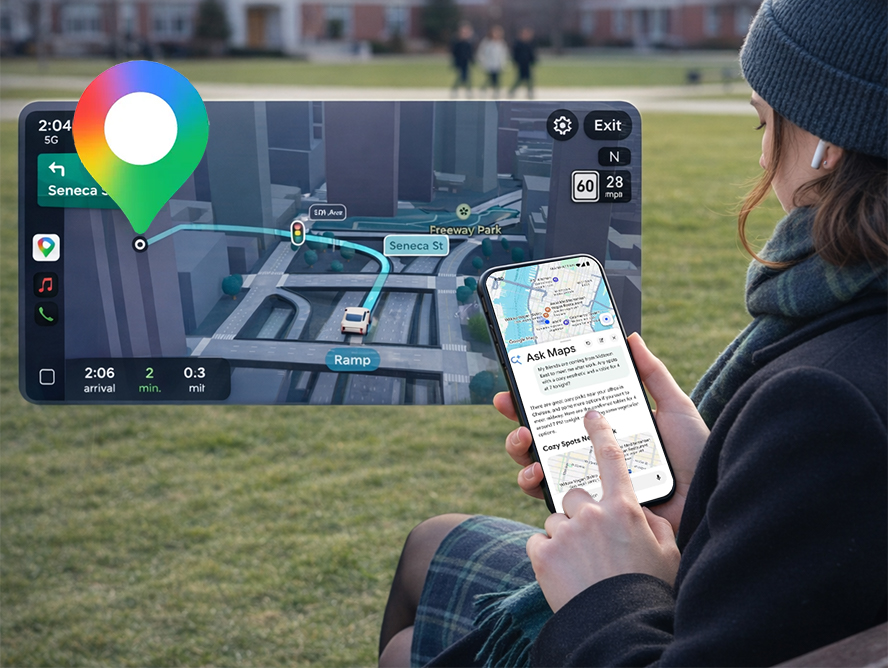
Google Maps is becoming far more intelligent thanks to new artificial intelligence features powered by Google Gemini. Google recently introduced two major upgrades to its mapping platform: Ask Maps, a conversational AI assistant, and Immersive Navigation, a redesigned navigation experience with advanced 3D visuals and smarter voice guidance.
These updates are designed to make trip planning and driving easier by letting users interact with maps using natural language while receiving more detailed real-world navigation information.
Below is a simple guide to what these features do and how to use them effectively.
What Is the Google Maps "Ask Maps" AI Feature?
Google Maps is becoming far more intelligent thanks to new artificial intelligence features powered by Google Gemini. Google recently introduced two major upgrades to its mapping platform: Ask Maps, a conversational AI assistant, and Immersive Navigation, a redesigned navigation experience with advanced 3D visuals and smarter voice guidance.
These updates are designed to make trip planning and driving easier by letting users interact with maps using natural language while receiving more detailed real-world navigation information.
Below is a simple guide to what these features do and how to use them effectively.
What Is the Google Maps "Ask Maps" AI Feature?
The new Ask Maps feature allows users to ask complex questions directly inside Google Maps using natural language.
Instead of manually searching for locations, you can ask questions such as:
"Where can I charge my phone nearby?"
"Is there a tennis court with lights open tonight?"
"What are good stops between my destinations?"
Ask Maps analyzes your request and returns personalized suggestions, routes, and tips from real users.
For example, if you're planning a road trip to places like Grand Canyon or Horseshoe Bend, Ask Maps can recommend interesting stops along the way, provide estimated travel times, and even suggest hidden attractions.
The system also personalizes answers using signals such as:
Places you previously searched
Locations saved in your account
Dining preferences (for example vegan options)
Popular local recommendations
This makes responses feel much more like a conversation with a travel assistant rather than a standard map search.
How to Use Ask Maps in Google Maps
Follow these steps to try the new AI feature:
Step 1: Update the Google Maps App
Make sure the latest version of Google Maps is installed on your Android or iOS device.
Step 2: Open the Search Bar
Tap the search bar inside the app.
Step 3: Ask a Question Naturally
Instead of typing a location, type a full question such as:
"Good coffee shops near me with Wi-Fi"
"Parking near downtown with EV charging"
"Best quiet restaurant for four people tonight"
Step 4: Review AI Suggestions
Ask Maps will display recommended places, routes, travel times, and sometimes helpful tips from other users.
Step 5: Start Navigation
Select a suggestion and begin navigation directly from the result.
Currently, Ask Maps is rolling out in the United States and India, with desktop support expected later.
What Is Google Maps Immersive Navigation?
Another major upgrade is Immersive Navigation, which transforms the driving experience with a more detailed visual interface.
The feature introduces a 3D environment that reflects real-world surroundings, including:
Buildings
Overpasses
Terrain
Road structures
The new visuals make navigation easier to understand, especially in complex areas.
This experience is similar to the 3D mapping style used in Apple Maps but integrates additional AI-powered guidance.
Key Features of Immersive Navigation
1. Detailed Road Information
The new system highlights important road elements such as:
Lanes
Crosswalks
Traffic lights
Stop signs
This helps drivers prepare for turns and lane changes earlier.
2. Smart Zoom and Route Preview
Google Maps now automatically zooms in or out during navigation so drivers can see upcoming intersections or complicated turns more clearly.
Transparent buildings allow you to look further down the road without losing context.
3. Natural Voice Navigation
Voice instructions are now more conversational.
Instead of saying something like:
"Exit in 0.5 miles."
The system may say:
"Go past this exit and take the next one for Illinois 43 South."
This makes instructions easier to understand while driving.
4. Alternate Route Explanations
If there are multiple route options, Maps now explains the differences.
For example:
A faster route with a toll
A longer route with less traffic
This allows drivers to choose based on their preferences.
5. Real-Time Road Alerts
The system also warns users about disruptions such as:
Road construction
Accidents
Traffic congestion
This information comes from both the Google Maps community and the driving app Waze.
How to Preview Destinations Before Arriving
Another useful addition is improved destination previews.
Before starting your trip, you can view the location using Street View imagery.
As you approach your destination, Google Maps can highlight:
The building entrance
Nearby parking areas
Which side of the street you should stop on
This can be extremely helpful in busy urban environments where parking and entrances are difficult to identify.
Why Google Maps Is Becoming More AI-Powered
These updates are part of Google's larger effort to integrate Google Gemini across its products.
The AI assistant already helps users:
Ask questions about locations
Discover restaurants and attractions
Add events to calendars
Get contextual travel information
By combining Gemini with mapping data and Street View imagery, Google Maps is gradually evolving into a full travel planning assistant rather than just a navigation app.
Final Thoughts
With Ask Maps and Immersive Navigation, Google Maps is becoming significantly more intelligent and user-friendly.
The new AI-powered search experience makes it easier to discover places, while enhanced navigation visuals and voice guidance help drivers stay informed on the road.
As these features continue to roll out globally, Google Maps is moving closer to a future where AI can plan, guide, and personalize every step of a trip.