Meta is preparing a major update for WhatsApp: Status updates will soon include a "Close Friends" feature. Similar to Instagram's popular Close Friends option, this update will let users share their posts with a smaller, more trusted circle of contacts.
While many U.S. users have never used WhatsApp Status, the feature is already massive worldwide, with 1.5 billion people posting daily. With Close Friends, WhatsApp is making Status more private, flexible, and engaging.
What Is WhatsApp Status?
If you're familiar with Instagram Stories, you'll instantly understand WhatsApp Status.
Users can post photos, videos, or text that disappear after 24 hours.
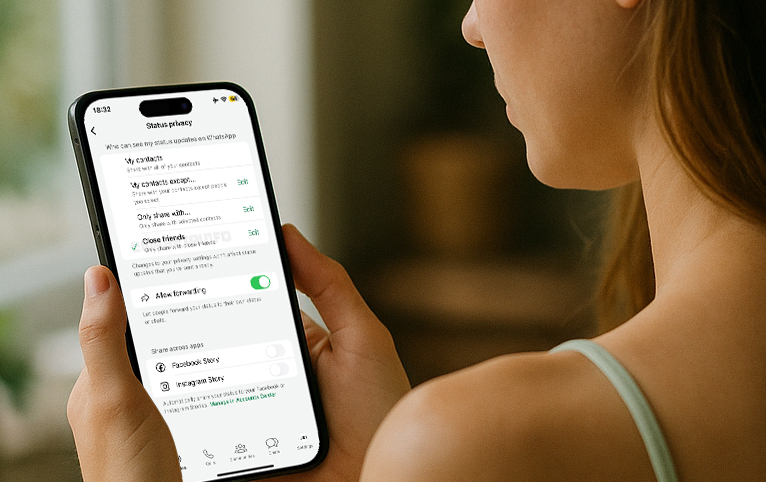
Current privacy options include:
My Contacts – Share with everyone in your contact list.
My Contacts Except… – Exclude specific people.
Only Share With… – Manually select people each time.
Many people rely on "Only Share With" as a workaround Close Friends list, but it can be time-consuming. That's why a dedicated feature is big news.
What's New With Close Friends on WhatsApp?
According to WABetaInfo, the latest iOS beta includes references to the new Close Friends feature. Here's what to expect:
Dedicated Close Friends List – Create and manage a private list inside the Status privacy settings.
One-Tap Sharing – When posting a new Status, simply choose "Close Friends" instead of selecting people manually.
Visual Indicator – Status updates shared with Close Friends will have a special-colored ring, so your contacts know it's exclusive.
Private and Silent – Like on Instagram, no one gets notified if they are added or removed.
How to Use WhatsApp Close Friends (Step-by-Step Tutorial)
Once the feature rolls out globally, here's how you can start using it:
Open WhatsApp Settings
Tap the three-dot menu → go to Privacy → select Status Privacy.
Create Your Close Friends List
Look for the new Close Friends option.
Add the people you want, then save the list.
Post to Close Friends
When sharing a Status update, choose Close Friends instead of "My Contacts."
Your chosen friends will see the update with a unique colored ring.
Manage Anytime
Edit your Close Friends list anytime without alerting others.
Why This Feature Matters
More Privacy – Share personal updates without your entire contact list seeing them.
Time-Saving – No need to manually select contacts every time you post.
Better Engagement – Builds a closer connection with your inner circle.
Final Thoughts
The WhatsApp Close Friends feature for Status updates will make sharing more private and personal for its 1.5 billion daily users. If you're someone who avoids posting because of privacy concerns, this update might change the way you use WhatsApp.
Do you currently use WhatsApp Status? Will you try Close Friends once it's available?