Instagram has launched a new Campus feature for U.S. college students, allowing them to display their school on their profile and connect with classmates. This rollout comes almost simultaneously with TikTok's newly launched "Campus Verification" student authentication service, highlighting a growing trend of campus-focused social networking. Here's how it works, how to enable it, and tips for networking safely and effectively.
What Is Instagram's Campus Feature?
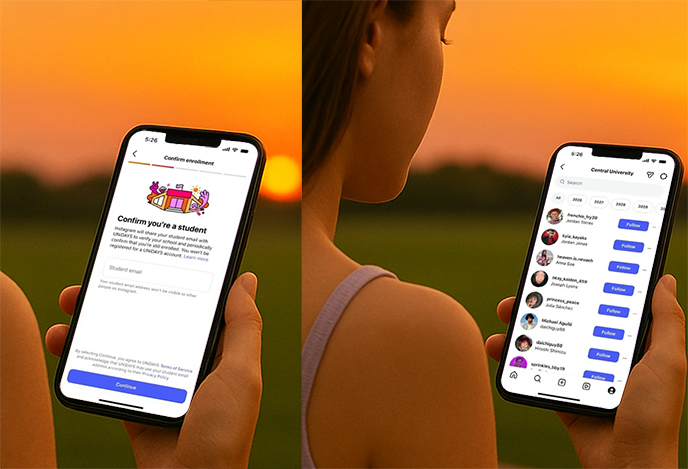
The Instagram Campus Feature is a student-focused social networking tool that lets users verify their enrollment through UNiDAYS and add their university to their profile. Once verified, students gain access to a student directory, making it easier to find and connect with others at the same school.
Key functions include:
Adding a school banner to your Instagram profile
Instagram has launched a new Campus feature for U.S. college students, allowing them to display their school on their profile and connect with classmates. This rollout comes almost simultaneously with TikTok's newly launched "Campus Verification" student authentication service, highlighting a growing trend of campus-focused social networking. Here's how it works, how to enable it, and tips for networking safely and effectively.
What Is Instagram's Campus Feature?
The Instagram Campus Feature is a student-focused social networking tool that lets users verify their enrollment through UNiDAYS and add their university to their profile. Once verified, students gain access to a student directory, making it easier to find and connect with others at the same school.
Key functions include:
Adding a school banner to your Instagram profile
Browsing a student directory of verified classmates
Filtering results by graduation year
Controlling who can see your school affiliation
In short, this feature works like a digital campus directory, but with stronger verification to ensure authenticity.
Key Highlights of the Feature
Profile Integration
Students can add their school via the "Add School" option in their profile settings. Once confirmed, a banner showing their university will appear on their profile.UNiDAYS Verification
Instagram has partnered with UNiDAYS, a global student verification platform, to prevent fake accounts and ensure that only enrolled students can access the campus feature.Student Directory Access
Verified students can browse a list of confirmed peers and filter by year to find classmates or fellow students in their cohort.Privacy Controls
Students can choose whether to display their school publicly, making the feature entirely optional.
How to Use Instagram's Campus Feature
If you're a college student in the U.S., here's how to activate the feature:
Step 1: Go to your profile
Open Instagram and head to your profile page.Step 2: Tap “Add School”
You'll see an option labeled Add School under your profile banner.Step 3: Verify your student status
Instagram partners with UNiDAYS, a student verification platform. You'll be asked to verify your student email address.Step 4: Choose visibility settings
After verification, you can decide whether your school info is visible to everyone, friends only, or remain private.Step 5: Browse the student directory
Once your school is added, you'll be able to browse a list of verified students at your university, either across the entire campus or by filtering by graduation year.Benefits of the Feature
For Students
Easier networking: Find and connect with classmates or future collaborators.
Community building: Create or join groups of students with shared interests.
Smooth transitions: New students can adapt faster by meeting peers before classes even begin.
For Universities
Boosted engagement: A modern digital extension of campus culture.
Student support: Helps connect newcomers with alumni or mentors.
For Brands
Targeted marketing: Brands can reach specific student audiences more directly.
Campus campaigns: Easier to promote events, deals, or product launches tailored for college students.
Viral potential: Students are highly active online, making word-of-mouth campaigns stronger.
Usage skills: How to use it correctly to expand your network?
While Instagram's campus feature makes it easy to connect with classmates, building truly valuable connections requires some skills:
Complete personal information
Upload a real profile picture and add interest tags to make it easier for others to get to know you.
Briefly introduce your major and interests so that fellow enthusiasts can find you quickly.
Take the initiative to say hello
When browsing the directory, if you see students in the same major or grade as you, you can politely send them a message.
Avoid a cold "Hi" and it's best to start a conversation based on the other person's interests or common topics.
Participate in the campus community
Pay more attention to interest groups and activity organization accounts on campus.
People you meet through social networks are more likely to develop long-term relationships.
Combining online and offline
Don't just stay in online communication, you can participate in offline activities to deepen the connection.
For example, reading clubs, academic lectures, and club gatherings at the same school.
Maintain a sense of boundaries
Expanding your network is not about "adding as many friends as possible", you need to learn how to screen and maintain valuable relationships.
Protect privacy appropriately and avoid excessive sharing of personal sensitive information.
Using Instagram's campus feature correctly can not only help you make friends quickly, but also help you build long-term and valuable connections.
Final Thoughts
Instagram's campus social features are gradually being rolled out in the US, offering a new tool for students looking to expand their campus network. It can help you connect with classmates and foster a more cohesive campus community. However, please be mindful of your privacy settings and protect your personal information.
If you are a college student in the United States, you might want to try turning on this feature so that your Instagram not only shows your life, but also becomes a new window to connect with classmates and alumni.



