Instagram recently launched its new map feature, Instagram Map, sparking widespread online discussion.
Some have called it a "Snapchat Map clone," while others have expressed concerns about privacy and tracking risks, particularly regarding domestic violence victims and those with high privacy concerns, who believe the feature could be easily abused.
So, what exactly is this feature? Does it actually share your location in real time? And how can you turn it off with one click? Here's a detailed explanation.
What exactly is Instagram Maps?
Instagram Map is a new feature launched by Meta that allows users to view the location-tagged content of friends or creators (including dynamic and Reels) on a map interface.
Officially, it is completely "voluntary", and you can choose to share your current location with friends or just browse the content they post on the map.
But here lies the crux of the dispute:
Some users saw others appear on the map and thought it was real-time location tracking
In fact, it is just the posts with location tags that are displayed on the map interface
Instagram CEO Adam Mosseri specifically clarified:
"What's shown on your map is the last location you posted, not your real-time location. We'll never show your real-time location unless you actively share it."
Feature Highlights
Explore content by location: View nearby photos, videos, and Reels on a map.
Friend's dynamic location: If both parties turn on sharing, you can directly see your friend's active location.
Localized Recommendations: Discover real, dynamic content about popular restaurants, attractions, and events.
Tag filtering: Quickly find content or creators you are interested in by location tags.
Default: Not mandatory: For users who do not enable location permissions, the map function will not be automatically enabled.
Why is it controversial?
Just two days after going online, there was a lot of concern and negative feedback on social media:
Privacy concerns: Many people worry that location data will be abused, which may lead to tracking, exposure of home addresses and other issues.
Security risks: For high-risk groups such as victims of domestic violence, minors, and public figures, leaking location may pose a real threat.
Misunderstanding phenomenon: Some users found that their Reels appeared on the map and thought that their location was being tracked in real time.
Instagram CEO Adam Mosseri explained:
"What you see on the map is the last activity with a location tag, not your real-time location.
Your real-time location will not be made public unless you actively share it."
Tutorial: How to completely turn off Instagram map location sharing
Don't want to appear on other people's maps? You can follow the official steps to turn it off:
Applicable systems: Android / iOS
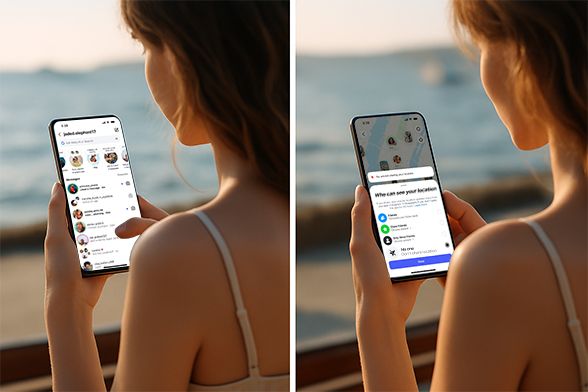
Open Instagram and tap the Messages icon in the upper right corner of the homepage.
At the top of the chat page, click Map
Click Settings in the upper right corner
Select "No one" in "Who can see your map location"
Click Update at the bottom to save
Note:
If you've never enabled location permissions for Instagram, the map feature is disabled by default and you won't see the settings entry.
If it's turned off, you can still manually add location tags when posting, but your real-time location will not be shared with anyone.
What does Instagram officially say?
Adam Mosseri, head of Instagram, responded:
The "map location" you see is just your most recent geotagged post, not your real-time location.
Your real-time location is never automatically shared unless you actively choose to share it.
UI (interface) optimization will be carried out later to reduce user misunderstandings.
Additional privacy protection suggestions
Check location permissions: In your phone's system settings, make sure Instagram's location permissions are set to "Never" or "Only while in use."
Check in carefully: Avoid including your current location when posting content, especially your home, school, or a regular coffee shop.
Clean up historical tags regularly: You can delete geotags in old posts to reduce location exposure.
summary
Instagram Maps doesn't require real-time location tracking, but its design can easily lead users to misinterpret it as "tracking." While Instagram Maps was originally designed to make it easier for users to discover the location-based content of their friends and creators, it can also pose privacy and security risks.
If you're concerned about privacy, it's recommended to immediately disable location sharing according to the instructions and use geotagging with caution.