Google has recently quietly launched a wave of practical updates for Google Photos! This revision not only brings a more modern and intuitive interface, but also adds many long-awaited features, such as "light mode", photo information that can be viewed at a glance, and "three-dot menu" integration. The current update has been pushed to iPhone users first, and Android users will also have the same experience "soon".
This article will analyze the highlights of this update in detail and teach you how to use the new features step by step so that you can easily play with the new version of Google Photos!
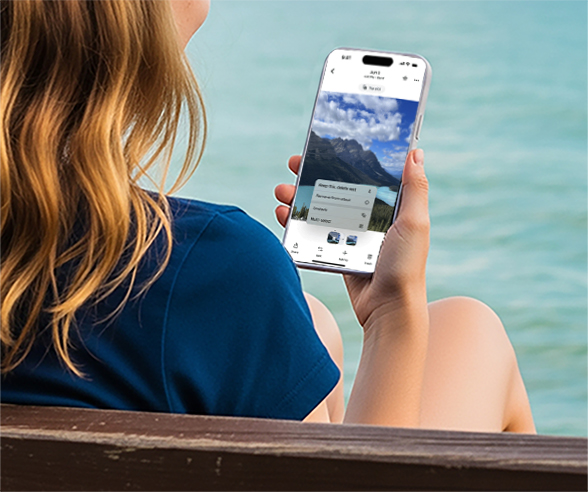
Update highlights at a glance
This update of Google Photos mainly focuses on interface optimization and information presentation, including:
1. A simpler photo viewing interface (Photo View)
When you click to view a photo, you will enter the newly designed "Photo View" page:
New UI: more modern, more intuitive, and simpler.
Light Mode: The interface background automatically matches the system theme of your device.
Information at a glance: time, date and shooting location are now displayed above the photo.
2. "Badge" function is launched
There are small capsule-shaped icons (Badges) below the image details:
Live / Motion photos can be played or paused directly
Change photo category (e.g. pets, landscapes, etc.)
Quickly save shared pictures
Manage storage space (e.g. clean up duplicate images)
3. The operation menu is more centralized
Tap the three-dot (⋮) menu in the upper-right corner of a photo to access the following features:
About: View photo metadata
Create: Generate animations, collages, etc
Cast: Cast to smart TV
Save as: Save
Download / Delete: download, delete pictures
Google Lens: Moved here (previously on the taskbar)
The new "Add to" menu replaces the old toolbar and allows you to quickly:
Archive photos
Add to album
Save to Locked Folder
4. More powerful photo stack management
For burst, burst or stack photos, you can now operate them in the "three-dot menu" next to the thumbnail:
Change the stack cover image
Delete or remove some photos
Unstack
One-click multiple selection for batch operation
Practical tutorial: How to use the new version of Google Photos to organize albums efficiently?
1. View details & use badge function
1. Open any photo.
2. Look at the top information (time, location), and the badge button will automatically appear below.
3. Click on the badge to:
Play Live Photo
Classified photos
Save or manage shared content with one click
2. Archive/encrypt your photos
1. Click the "⋮" menu in the upper right corner > select "Add to".
2. you can:
Add to existing or new album
Move to "Encrypted Folder" (password required)
Archive photos you don't view often to keep your home screen tidy
3. Use Google Lens to analyze image content
1. Also find Google Lens in the "⋮" menu.
2. It can help you:
Recognize the text in the image and copy it
Search for objects, attractions, and food in images
Get shopping links or encyclopedia information
4. Manage burst photos/stacks
1. When viewing a burst or stack of images, tap ⋮ next to the thumbnail.
2. Executable:
Change display cover
Unstack
Delete some of them
One-click batch operation
Practical advice: How to make the most of this update?
Switch the system theme and try the light mode to experience a different visual experience
Get familiar with the new menu location to avoid losing common functions
Manage photo categories and storage with badges
Regularly organize stacks and burst photos to improve the cleanliness of the gallery
Pay attention to Android update dynamics and upgrade to experience the new version as soon as possible
Who is suitable for the update experience?
Users who like simple UI
Photography enthusiasts who often take Live/Motion photos
Heavy users who need to frequently categorize or encrypt photos
Users who have a strong demand for "information at a glance"
Applicable Platforms
iPhone users
Go to the App Store now to update to the latest version and use it!
Android users
Google said it is "coming soon", so please pay attention to Play Store updates or open Google Photos and wait for automatic push.
How to quickly get started with new features?
1. Update your Google Photos app to the latest version (App Store / Google Play).
2. Open any photo and observe the information displayed at the top and the badge changes at the bottom.
3. Click the three-dot menu in the upper right corner to experience new features such as Lens recognition, Save as, etc.
4. Try browsing through bursts or stacks of photos to see how much more efficient the new menu is.
5. Go to system settings, switch light/dark mode, and see how the background changes adaptively.
Conclusion
Google Photos is already a powerful library management tool, and this update makes photo organization and information acquisition more convenient and efficient.
It is very friendly to users who like Live Photo, continuous shooting, and categorized storage.
The overall experience is closer to the native iOS/Android system, reducing the complexity of operation.
Have you tried the new version of Google Photos? Which new feature do you think is the most useful?



