Recently, Google launched an exciting new feature in the US Search Labs: upload your photos and AI will help you "try on" clothes! Not only that, but AI personalized shopping assistant and automatic checkout functions are also available online, making your shopping easier, smarter and more convenient.
This article will analyze these new features in detail and provide tutorials to help you enjoy the new era of Google AI shopping!
What are the new features?
The AI try-on feature is now available: Try on clothes with your photos!
AI Mode smart shopping assistant: one-click recommendation of the most suitable products for you!
Buy For Me: AI will automatically place your order for you!
1. What is Google's AI "try on" clothes function?
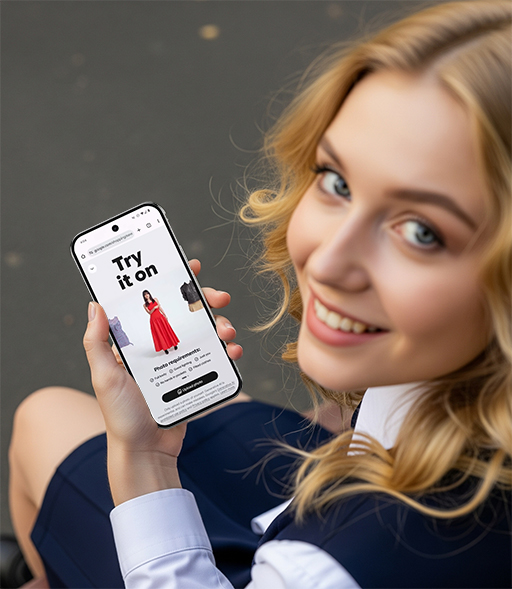
Google's "AI Virtual Fitting" feature allows you to upload a full-body photo , and then AI will generate a picture of you wearing specific clothes. Currently supported clothing types include:
Pants
Shirts
Dresses
Skirts
Key highlights:
Realistic wearing simulation, taking into account fabric wrinkles, stretch and fit;
Generate clothing images based on your own body shape , no longer relying on standard models;
You can save and share pictures to facilitate discussion with friends or display on social platforms;
It is currently only available for testing in Search Labs in the United States.
How to use Google's AI "Try on" clothes function?
Currently, this feature is open for testing in Search Labs in the United States. Here's how to enable it:
Step 1: Open Search Labs
1. Open the Google app or web version
2. Click the Search Labs icon (a lab test tube icon) at the top of the search page
3. Find the "AI Try-On Clothing" function and click to enable it
Tips: The first time you enable it, you may need to wait for the system to load or verify permissions
Step 2: Search for clothing and click the "Try On" button
1. Enter product keywords in Google search, such as "floral summer dress"
2. In the search results, find the product with a "Try it on" button
3. Click the button and you will be prompted to upload a photo
Step 3: Upload your full-body photo
Requirements:
Full body frontal photo (standing pose)
Clear background, sufficient light
Don't wear too thick clothes (it is recommended to wear close-fitting clothes for taking photos)
After uploading, AI will generate an image of you wearing the product in seconds. You can save, download or share it to social platforms.
2. What is the AI Mode intelligent shopping assistant?
In addition to the fitting experience, Google has also launched a new AI Mode , AI Mode is the next generation of Gemini artificial intelligence-driven search experience launched by Google . It combines natural language understanding with e-commerce search capabilities. It can communicate with users like a "shopping consultant", understand your real needs, and automatically recommend the most suitable products.
For example:
You tell the AI, "I'm traveling to Portland in May and need a new backpack."
AI Mode automatically recognizes:
Location: Portland (rainy all year round)
Time: May (may rain)
Requirements: travel + waterproof + large storage space
Final recommendations may include:
Waterproof fabric
Multiple compartments
Lightweight and durable
Suitable for carry-on
Compared with traditional keyword search, this multi-round conversational shopping experience is closer to a "personal shopping guide" , and it responds quickly and does not require you to screen repeatedly.
3. What is the "Buy for Me" function?
"Buy for Me" is an AI-powered automatic checkout feature that Google is about to launch . Once you confirm your purchase intention, it will automatically help you go to the merchant's website and complete the payment using Google Pay. The entire process is executed by AI, without manual operation, greatly improving online shopping efficiency.
Usage method:
1. Find the product you like and click "Track Price";
2. Settings: size, color, budget;
3. When an item drops to your preset price, Google will notify you.
4. If you turn on " Buy for Me ", AI will automatically go to the merchant's official website and complete the payment through Google Pay, without you having to jump to multiple pages. All of this will be accomplished while ensuring security and privacy, greatly reducing the tediousness of traditional online shopping operations.
This feature will be launched in the United States soon and may be expanded to other regions later.
What impacts has the AI shopping model brought?
For consumers:
Save time: search, try on, and compare prices all in one place;
Increased confidence: the trying-on and checkout process is more controllable;
Higher cost-effectiveness: AI automatically discovers hidden discounts.
For e-commerce platforms:
This forces the platform to optimize product structure and open interfaces;
Brands need to adapt to virtual try-on models and AI search rules.
To content creators and KOLs:
New sales channels: Combine AI shopping suggestions to generate "grass-planting videos" or "good stuff lists";
AI-assisted product selection: Creators can use the Gemini model to quickly discover hot-selling trends.
FAQ
Q1: Is it safe to upload photos to try on clothes? Will Google save my photos?
A: Google said that the uploaded full-body photos are only used to generate fitting images and will not be used for advertising or training models . After the photos are generated, users can choose to save or delete them, and privacy protection is in line with Google's standard policy.
Q2: What is the difference between AI Mode and normal shopping search?
A: AI Mode is more like a conversational shopping assistant that can understand your specific needs and make multiple rounds of intelligent recommendations, rather than just filtering products by keywords like traditional e-commerce. Its recommendations are more accurate and save time.
Q3: Will "Buy for Me" be automatically paid? Is it safe?
A: Yes, after you confirm the "Buy for Me" order, Google will help you complete the payment through the bound Google Pay account. The whole process is completed in a secure channel, your account or card number information will not be disclosed, and users can cancel the operation at any time.
Q4: How to use the price tracking function?
A: Click "Track Price" on the product page, set the size, color and ideal price you want, and Google will proactively notify you when the product price drops . Combined with "Buy for Me", it can also automatically help you complete the purchase.
Conclusion
Google's AI shopping model is quietly reshaping the way we shop online. From trying on, chasing prices to checkout, the integrated experience of " browsing + buying" is about to become mainstream.
If you are a consumer, content creator, or e-commerce seller who likes online shopping, this wave of innovation is worth your understanding and trying in advance!
Have you ever tried trying on clothes with Google AI? Are you satisfied with the effect?