Recently, Spotify has welcomed an important update to its iOS app: iPhone users can finally purchase audiobooks directly in the app! This not only marks a phased victory for Spotify in its years-long battle with Apple, but also brings unprecedented convenience to users.
This article will explain the significance of this update for you, and attach a detailed tutorial to teach you how to buy audiobooks and "continue listening" time directly in the Spotify iPhone app.
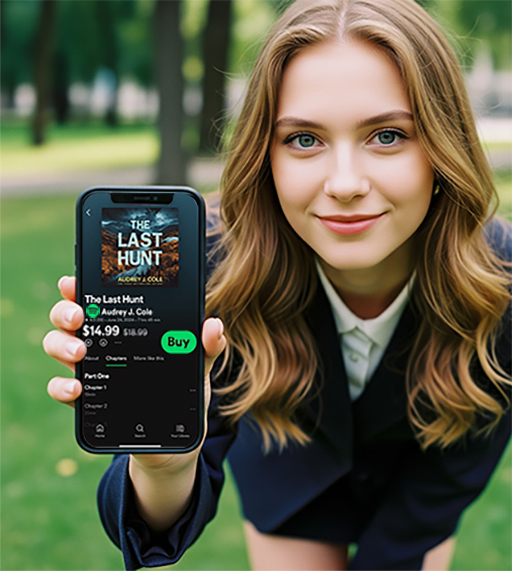
What does this Spotify update mean?
In 2022, Spotify removed the audiobook purchase function on iOS due to Apple's restrictions on in-app purchases. This means that users must complete the purchase on the web version before returning to the app to listen to the book, which is extremely inconvenient.
But just this month, thanks to the US court's ruling in the Epic Games v. Apple case (ruling that Apple cannot interfere with external payment methods), Spotify has obtained Apple's approved update rights - now, iPhone users can purchase audiobooks directly within the Spotify App.
What new feature highlights does Spotify bring in this update?
View the price of audiobooks directly in the App
One - click purchase, no need to jump to the webpage
Support the purchase of additional listening time (Top-up)
Tutorial: How to buy audiobooks in Spotify iOS App?
Follow this tutorial and you can complete your purchase in just a few clicks without having to navigate around:
Step 1: Update your Spotify App
Open the App Store and find Spotify
Click [Update] to make sure you are using the latest version
Step 2: Enter the "Audiobook" section
Open the Spotify app
Select "Search" in the bottom navigation bar → enter "Audiobooks" or directly enter the Audiobook column on the homepage banner
Step 3: Browse and select a book that interests you
The price is clearly shown below each book.
A new [Buy] button has been added next to it.
Step 4: Complete the purchase process
Click [Buy]
You will be redirected to an external payment page (not through Apple's in-app purchase system)
After the payment is successful, the book will immediately appear in your "library" and you can listen to it at any time.
How to purchase additional "audio time"?
Spotify provides each user with 15 hours of free audiobooks per month by default . If you don't listen to enough, you can also purchase a "top-up":
Every 10 hours: $13 USD
Support direct payment purchase in App
How to buy:
Go to "Settings > Audiobooks > Buy More Time", or purchase directly when the "Insufficient Time" reminder pops up during playback.
Tip: Save even more by doing this!
Free users can also purchase audiobooks, but they cannot enjoy the 15 hours of free time;
Using external payment can avoid Apple's commission (usually up to 30%), and the author can get more money;
Spotify's audiobook library is continuing to expand, and it's more cost-effective to pay attention to new books.
Why is this update worth noting?
1. For users:
No need to jump to the web page to purchase, the experience is smoother
Easier to discover, purchase, and try audiobooks
Increase usage frequency and lower the threshold for listening to books
2. To publishers and creators:
Reach more new users, increase exposure and revenue
More flexibility in conducting sales and promotion activities
3. For the industry ecosystem:
Apple's App Store revenue model will be further broken
More platforms may follow Spotify's lead and open up iOS payment channels
Which apps are also benefiting and responding quickly?
Spotify is not the only one to benefit. The following apps are also gradually applying the court's new rules:
Kindle: Gradually restore in-app purchase link guidance.
Patreon: Provides direct subscription links.
Delta emulator: provides external links for ROM resource downloads.
Although Epic Games is still fighting with Apple, the impact of this lawsuit is expanding, and the "closed payment ecosystem" of the mobile platform is being broken.
Tips:
Currently, this feature is only available to iPhone users in the United States. Other regions need to wait for subsequent updates.
Purchase records will be synchronized in the account and can still be used after changing devices
Non-Premium users can also purchase and listen to audiobooks
Conclusion
This update is not only a victory for Spotify users, but also a major innovation in the user experience in the Apple ecosystem. From now on, iPhone users no longer need to jump to the browser, copy the link or be forced to use the App Store to purchase audio content .
Do you think the new features updated by Spotify this time are practical?



