Apple Maps is finally no longer just a navigation tool - now, it is more like your "travel assistant". The latest update integrates the world's three major high-end recommendation platforms: MICHELIN Guide, The Infatuation and Golf Digest.
This move not only enhances the practicality of the map but also maximizes your experience of "eating, drinking, playing and having fun". This article will take you to quickly understand the new features and teach you how to use them efficiently.
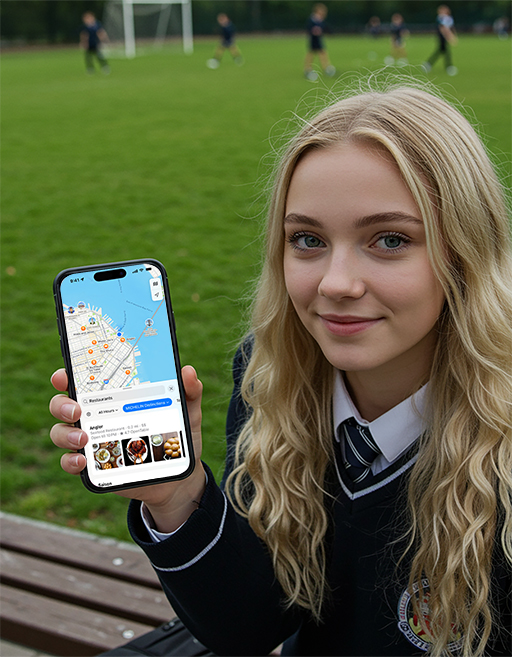
What are the highlights of this Apple Maps update?
Apple Maps recently announced that it has partnered with the MICHELIN Guide , The Infatuation, and Golf Digest. This means that in the future, when you use Apple Maps, you can not only find your way, but also:
View Michelin recommended restaurants (including ratings and reviews)
Get The Infatuation's top dining recommendations
Browse and book Michelin Select hotels
Filter top-rated golf courses
Use travel guides jointly produced by the above platforms
In a nutshell: Apple Maps is becoming "useful and sophisticated."
Michelin blessing: find star-rated food on the map
New feature highlights:
Map search can directly filter "Michelin recommended restaurants"
Support viewing restaurant ratings, introductions, and pictures
You can directly jump to the booking link to save searching time
How to use?
Open Apple Maps.
Type "restaurants" or a specific cuisine (like "Japanese") into the search bar.
Scroll down to view the filters and tap " Michelin Guide Recommendations ".
Click on a restaurant to view detailed information and a link to make a reservation.
Warm reminder : Don't wait until you are hungry to find a Michelin restaurant. Most of them require reservations, so it is recommended to plan ahead!
The Infatuation: Reliable and down-to-earth local food recommendations
Looking for a good place to eat without disappointment? The Infatuation to the rescue!
New feature highlights:
Provide regional and scenario-based restaurant recommendations (such as "suitable for friends gathering" and "suitable for dining alone")
Real reviews and rating mechanism, high reference value
How to use?
When searching for restaurants, select " Recommended by The Infatuation ".
Browse the recommended list, each store will have a recommendation reason and review summary.
Collect the stores you are interested in, or navigate there directly using the map.
Where to stay? Book a Michelin recommended hotel directly on the map
Many people don't know: Michelin not only reviews restaurants, but also recommends quality hotels around the world. This time, Apple Maps has also integrated this feature!
New feature highlights:
Check out the list of Michelin recommended hotels, accurate and reliable information
Jump to the booking page with one click to reduce the number of platform jumps
How to use?
Search for a city or place of interest, such as "Paris."
Click on the 'Accommodation' or 'Hotels' category.
Select the Michelin Recommended filter.
Browse hotels, view photos, ratings and location, and make eservations.
Golf Digest: It's not difficult to find high-end golf courses
Although not everyone plays golf, if you are a golfer, this wave of map updates is definitely good news.
New feature highlights:
Check out Golf Digest's recommended golf courses
Includes course ratings, facility descriptions and user feedback
How to use?
Search for "golf courses" or a specific area + "golf".
Filter by Golf Digest Recommended courses.
View course details, service content and user reviews.
"Exquisite life" in one step: Use Apple Maps' Curated Guides
Apple Maps also integrates recommendations from Michelin, The Infatuation and Golf Digest into city guides, perfect for travel or light weekend exploration.
How do I access the featured guides?
Pull down the homepage of Apple Maps and find " Explore Guides " or " Curated Guides ".
Filter by city or interest category, such as "Tokyo food guide" or "New York weekend destinations."
Tips: How to ensure you use these features?
Please upgrade your iPhone to the latest iOS version
When opening Apple Maps, make sure Location Services is turned on.
The current function is launched in the United States first , and other regions are expected to be launched in succession
Why is this update worth paying attention to?
1. Apple Maps is quietly becoming a travel assistant
Apple Maps was once criticized for its navigation being inferior to Google Maps, but in recent years Apple has continued to focus on " lifestyle scenario integration ". From walking navigation and real-life AR to this time's food and golf recommendations, Maps is becoming an extension of your daily life.
2. The entrance to a refined life becomes within reach
In the past, you may have needed to browse multiple platforms to find travel guides, but now you can open Maps to locate Michelin, find hotels, and arrange weekend activities with just one click, making your "quality of life" time-saving and worry-free.
3. A huge opportunity for content creators/travel bloggers
Apple Maps' "Featured Guides" feature is likely to gradually open up UGC (user-generated content). Start learning how to make beautiful route recommendations now, and maybe you can become an official Maps recommendation expert in the future!
Content creators & travel bloggers must read: How to use this wave of Apple Maps upgrades to create popular content?
The collaboration between Apple Maps and Michelin, The Infatuation, and Golf Digest not only improves the user experience, but also provides an excellent source of material for content creators and travel bloggers. You can use the following methods to create popular content with high traffic and high interaction:
1. Map-based Food Challenge
Suitable platforms: TikTok / Instagram Reels / Xiaohongshu Video / YouTube Shorts
Examples of popular topics:
"What would it be like to eat at all the Michelin-recommended restaurants on Apple Maps in one day?"
"Use The Infatuation on Apple Maps to discover hidden local delicacies 24 hours a day"
"The map says I should eat here: A day of challenging Apple Maps' restaurant recommendations"
Photography suggestions:
Screen recording of map search process + on-site store visit
Use a scoring mechanism to review (taste, cost-effectiveness, real experience)
2. "Curated Luxury Day" route video
Suitable platforms: YouTube long videos / Xiaohongshu pictures and texts or collections
Hot sales route structure:
Breakfast: Michelin recommended coffee shop
Morning activities: Golf Digest recommended golf courses/light luxury exhibition
Lunch: The Infatuation's recommended hidden restaurant
Afternoon leisure: Michelin hotel afternoon tea
Night: Highly rated restaurants + Night view navigation
Content highlights:
Route planning with Apple Maps
The map usage process is shown during shooting, which is practical
Matching clothing & lifestyle content to increase the appeal
3. City Map Guide + "Explore the City with Apple Maps" Theme Series
Suitable platforms: YouTube / Instagram Reels / Douyin / Xiaohongshu
Hot title inspiration:
"First time in New York? Use Apple Maps to help you find food, accommodation and entertainment!"
"Travel in Tokyo by yourself. Use Apple Maps' selected guide to find a god-level route"
"Traveling alone but don’t want to make mistakes? Teach you how to use Apple Maps to find hotels + food + landmarks"
Bonus Tips:
Make a map route screenshot as a cover/cover image element
Guide the audience to ask in the comment section: "Which city do you want to see me challenge next?"
4. Interactive content: Let fans participate in route creation
How to play:
"Which Michelin do you want me to eat? Vote for it!"
"I used Apple Maps to make a list of restaurants for you to choose."
"Based on your location, I will help you find Michelin food!" (Comment interaction)
5. Technical tips & practical suggestions:
Screen recording content : Demonstrating the use process of Apple Maps (search, filter, and book) is very important, which not only increases the sense of "dry goods" but also increases trust.
Feedback from actual testing : Compare the map recommendations with your own experience to create a sense of content conflict between "map and reality".
AI+ content creation : You can use AI (like me) to help organize routes, optimize scripts, create cover copy titles, etc. to improve efficiency.
Conclusion
Apple Maps is transforming from a "navigation tool" to a "high-quality lifestyle platform". This wave of updates is particularly suitable for:
People who like to explore high-quality food;
Users who pursue quality accommodation during travel;
If you love golf or want to try a high-end lifestyle.
Next time you open Apple Maps, don't just check the route, why not check out what "life surprises" are worth experiencing nearby.
Have you tried these new features of Apple Maps? Would you prefer to use it to find restaurants, book hotels or play golf?



