If you're looking to expand your business on TikTok, registering as a business account is the first step. In this guide, we'll walk you through the process of registering your business on TikTok.
Step 1: Open Your TikTok Account
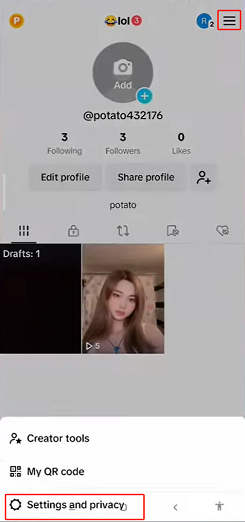
To get started, open your TikTok account and go to your profile. Click on the tree bar icon in the top right corner of your screen and select "Settings and Privacy."
Step 2: Switch to Business Account
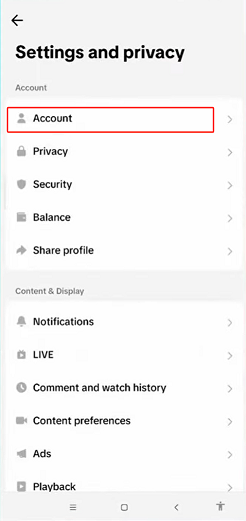
Once you're in "Settings and Privacy," click on "Account" and select "Switch to Business Account." Follow the steps that TikTok asks you to complete.
Step 3: Complete Your Profile
After switching to a business account, complete your profile by providing all the necessary information. Once you're done, click on the X at the top left of your screen.

Step 4: Go to Business Suite
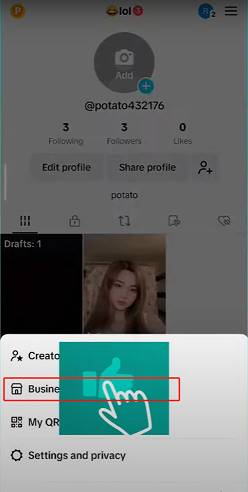
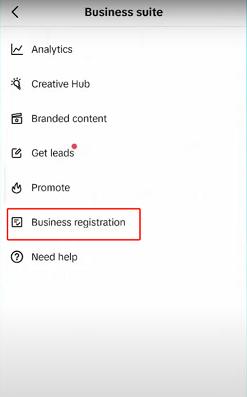
Click on the tree bar icon again and select "Business Suite." From there, click on "Business Registration."
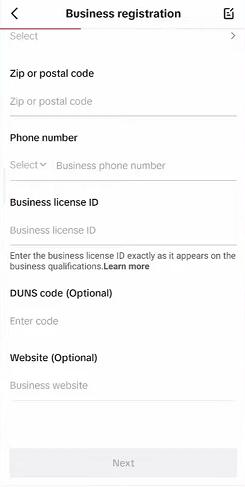
Step 5: Provide Your Business Information
TikTok will ask you to provide some information about your business, including legal business name, country or region, address, province/state, city, postal code, phone number, business license ID, DUNS code (optional), and website (optional).
Step 6: Submit Your Registration
Once you've provided all the necessary information, click on "Register."
By following these steps, you'll be able to register your business on TikTok and take advantage of the platform's advanced features, such as the ability to advertise and sell products. Don't miss out on this opportunity to expand your business on one of the fastest-growing social media platforms.