Looking for a better way to manage your online orders and shipping updates? Gmail has introduced a new Purchases tab that lets you track packages, organize shopping emails, and stay on top of deals—all without leaving your inbox. Learn how to use Gmail's package tracking and Promotions category features to make online shopping easier than ever.
Key Features of Gmail's Purchases Tab
1. Unified shopping dashboard
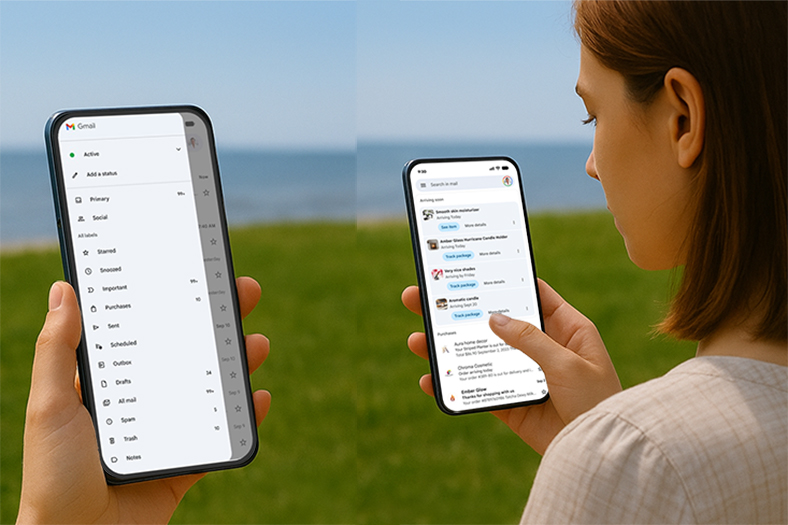
The new Gmail Purchases tab automatically organizes your order confirmation emails, shipping updates, and delivery notifications in one place. Instead of jumping between multiple retailer websites or carrier portals, you can see all your package details directly inside Gmail.
2. Priority for upcoming deliveries
Looking for a better way to manage your online orders and shipping updates? Gmail has introduced a new Purchases tab that lets you track packages, organize shopping emails, and stay on top of deals—all without leaving your inbox. Learn how to use Gmail's package tracking and Promotions category features to make online shopping easier than ever.
Key Features of Gmail's Purchases Tab
1. Unified shopping dashboard
The new Gmail Purchases tab automatically organizes your order confirmation emails, shipping updates, and delivery notifications in one place. Instead of jumping between multiple retailer websites or carrier portals, you can see all your package details directly inside Gmail.
2. Priority for upcoming deliveries
If you have a package scheduled to arrive within the next 24 hours, Gmail will display it at the top of your inbox. This helps ensure you don't miss important deliveries.
3. Smarter holiday shopping management
According to PwC's 2025 Holiday Outlook, nearly 39% of all holiday gift spending will take place between Thanksgiving and Cyber Monday. With potentially dozens of orders coming in during that period, the Purchases tab will make it easier to track shipments and avoid confusion.
4. Promotions category upgrade
The Gmail Promotions tab now includes a new "Most Relevant" sorting option.
It prioritizes offers from brands you interact with most.
Gmail will also nudge you with reminders about expiring discounts and limited-time deals, ensuring you never miss out on savings.
How to Use the Gmail Purchases Tab
The new feature is rolling out globally on both the Gmail mobile app and Gmail web version for personal Google accounts.
Here's how you can start using it:
Update Gmail
Access the Purchases tab
Open Gmail and look for the "Purchases" tab in your navigation menu.
The first time you enter, Gmail will scan your inbox and automatically generate a list of your past and upcoming orders.
Track package status
Sort and view promotions
Go to the Promotions tab, tap the sorting menu, and select "Most Relevant".
Gmail will highlight the deals most relevant to your shopping habits.
Pro Tips for Smarter Shopping With Gmail
Holiday season ready: Activate the Purchases tab before Black Friday or Cyber Monday to keep all your orders in order.
Use smart deal filtering: The Promotions "Most Relevant" option ensures you see the offers that matter most.
Take advantage of reminders: Gmail will notify you of expiring deals so you can act before missing out.
Streamline your inbox: Pair Purchases with the unsubscribe tool to reduce email noise and focus only on important updates.
Who Will Benefit Most?
Frequent online shoppers – no need to manually search tracking numbers.
Holiday shoppers – stay on top of multiple packages during busy sales.
Deal hunters – never miss out on limited-time promotions.
Combine With Gmail Subscription Management
In addition to the Purchases and Promotions updates, Gmail recently introduced a subscription management feature.
When combined, these tools transform Gmail into a complete shopping email management hub—helping you track packages, organize promotions, and declutter your inbox.
Final Thoughts
With the launch of the Purchases tab and the upgrade to the Promotions category, Gmail is evolving beyond a traditional email client into a centralized shopping and package tracking assistant.
All your orders and shipments are consolidated in one place.
Delivery updates are prioritized so you never miss an important package.
Promotional emails are sorted by relevance, helping you catch the best deals.
Subscription management tools let you declutter and stay organized.
For frequent online shoppers, these features can save both time and effort—especially during busy holiday sales periods. If you haven't updated your Gmail yet, now is the perfect time to explore the new Gmail Purchases tab and experience a smarter way to manage shopping emails and package tracking.



