Spotify has rolled out a brand-new feature designed to make your listening experience more personal and efficient: Smart Filters. With this update, users can now filter their music library by activity, mood, or genre, making it easier to find the perfect track, playlist, or podcast for any moment.
This new tool goes beyond a simple search upgrade. It represents Spotify's ongoing commitment to personalization, adding to existing features like the AI DJ, Discover Weekly, personalized playlist creation, and custom cover art tools. If you often feel overwhelmed by the sheer size of your music library, Smart Filters could be the solution you've been waiting for.
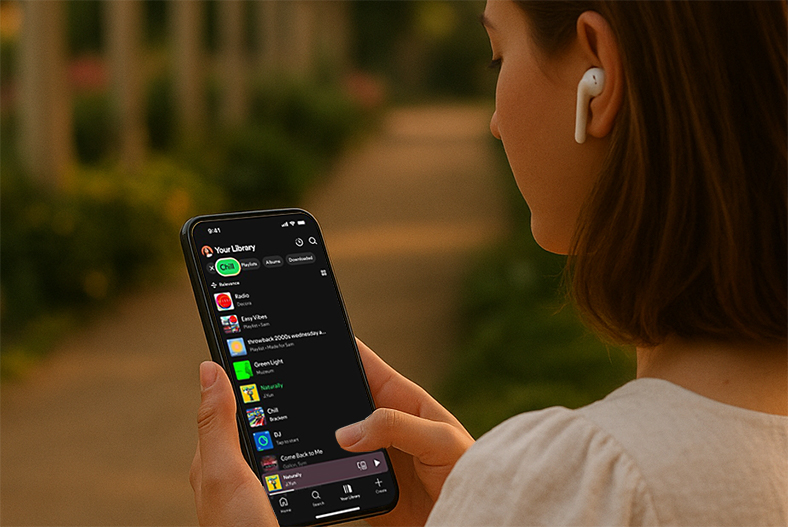
What Are Spotify Smart Filters?
Smart Filters allow Premium users to quickly organize their music library with one tap. Instead of scrolling endlessly or typing keywords, you can simply choose from preset tags:
By Activity: Workout, Study, Commute, Party, and more.
By Mood: Chill, Happy, Sad, Focused, Romantic, etc.
By Genre: Pop, Rock, Jazz, Hip-Hop, EDM, Classical, and more.
The filters apply not only to your saved songs but also to playlists, audiobooks, and podcasts. For an even more dynamic experience, you can combine Smart Filters with Spotify's AI DJ, which generates a personalized listening session based on your selected filter.
Where Is the Feature Available?
Currently, Spotify Smart Filters are rolling out gradually:
Device support: Available first on mobile phones and tablets.
Eligibility: Limited to Spotify Premium subscribers.
Markets: U.S., U.K., Canada, Ireland, Australia, New Zealand, and South Africa in the first wave, with more countries expected in the coming weeks.
If you don't see the feature yet, make sure your Spotify app is updated to the latest version, as rollout is happening in stages.
How to Use Spotify Smart Filters (Step-by-Step Tutorial)
Using Smart Filters is simple. Here's a quick guide:
Open the Spotify app and tap on Your Library at the bottom of the screen.
At the top of your library page, you'll notice new filter tags.
Choose a filter type:
Activity: e.g., Workout, Study, Driving.
Mood: e.g., Chill, Happy, Sad, Focused.
Genre: e.g., Pop, Jazz, Rock, Hip-Hop.
Once you tap a filter, Spotify will instantly display the content that matches — whether it's songs, playlists, or podcasts.
For a more personalized touch, activate AI DJ after applying a filter, and Spotify will build a dynamic, mood-based listening queue for you.
This way, you no longer need to scroll through endless playlists or type in multiple searches. The right music is just one tap away.
Why Spotify Smart Filters Matter
The addition of Smart Filters might seem like a small update, but it offers several advantages:
Saves time: Perfect for large libraries where finding the right track can take minutes.
More personalization: When combined with Spotify AI DJ or Discover Weekly, filters create an even smarter recommendation system.
Competitive edge: While Apple Music and YouTube Music focus on catalog size and video content, Spotify strengthens its position with advanced personalization tools.
Supports multiple use cases: Whether you're studying, working out, commuting, or relaxing, Smart Filters instantly adapt to your needs.
Extra Tips for Better Use
Pair with AI DJ: After filtering by mood or activity, let AI DJ take over for a more interactive experience.
Use filters for podcasts: It's not just for music — podcasts and audiobooks also benefit from the new tags.
Combine with custom playlists: Use filters to discover forgotten tracks in your library and add them into personalized playlists.
Stay updated: Spotify frequently tests new features. Keeping your app updated ensures you don't miss out.
Final Thoughts
Spotify's Smart Filters aren't just a cosmetic change — they're a practical solution for users who want faster, smarter, and more tailored access to their music. With the ability to filter by activity, mood, and genre, plus integration with the AI DJ, Spotify continues to position itself as the most personalized music streaming service on the market.
If you're a Premium subscriber, check your Spotify app today. Once the update reaches your region, Smart Filters may quickly become one of the most useful tools in your daily listening routine.