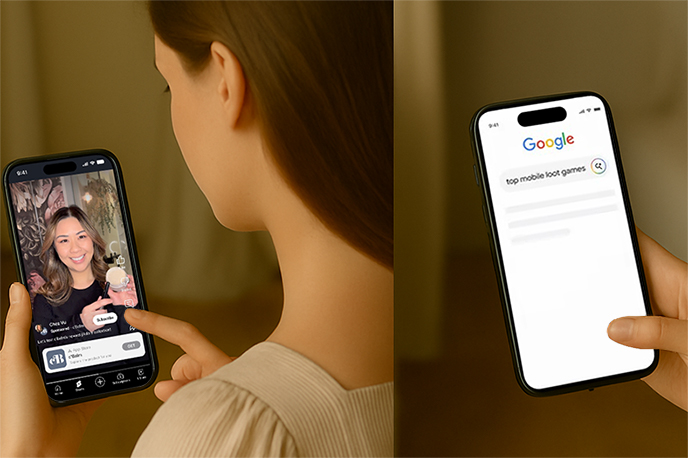
YouTube has officially introduced Custom App Promotions for Shorts creators, enabling them to showcase app promotions directly within short videos. This feature integrates Partnership Ads into app campaigns, allowing creators to add a custom call-to-action (CTA) panel at the bottom of their Shorts videos to drive app downloads or sign-ups.
This update offers new opportunities for YouTube Shorts monetization and targeted brand advertising, benefiting both creators and app developers.
Learn how YouTube Shorts Custom App Promotions work, how creators can monetize, how brands can run targeted campaigns via BrandConnect, and how to use tROAS bidding to optimize app promotion results.
What Are YouTube Shorts Custom App Promotions?
YouTube has officially introduced Custom App Promotions for Shorts creators, enabling them to showcase app promotions directly within short videos. This feature integrates Partnership Ads into app campaigns, allowing creators to add a custom call-to-action (CTA) panel at the bottom of their Shorts videos to drive app downloads or sign-ups.
This update offers new opportunities for YouTube Shorts monetization and targeted brand advertising, benefiting both creators and app developers.
Learn how YouTube Shorts Custom App Promotions work, how creators can monetize, how brands can run targeted campaigns via BrandConnect, and how to use tROAS bidding to optimize app promotion results.
What Are YouTube Shorts Custom App Promotions?
Custom App Promotions are a new ad collaboration model on YouTube Shorts, built on Google's Partnership Ads framework. They allow creators and brands to co-present app ads in a native, visually engaging way.
Key features:
Co-branded ad creation: Ads are tailored to match the creator's content style, increasing authenticity and audience trust.
Custom CTA panel: A clickable button appears at the bottom of the Shorts video, driving direct conversions.
Playable ad formats: Some campaigns include interactive post-video playable ads to boost engagement.
BrandConnect integration: Brands can directly find and collaborate with creators who match their target audience.
In short, it's a win-win model: creators get more monetization options, and brands get precise user acquisition opportunities.
Key Benefits of the Feature
Native ad integration: Promos blend naturally into Shorts content for higher click-through rates.
AI-powered ad optimization: Supports tROAS (target return on ad spend) bidding for better ROI.
Auto video adaptation: Google AI can resize or flip videos for different platforms and devices.
How do creators start YouTube Shorts App promotion cooperation?
If you are already in the YouTube Partner Program (YPP), here's how to enable and optimize this new monetization channel:
Step 1 – Check Your Eligibility
Make sure your channel is part of YPP and meets the Shorts monetization requirements.
Ensure that your country/region supports BrandConnect (availability is expanding).
Step 2 – Register for BrandConnect
Go to YouTube BrandConnect.
Complete your profile, audience insights, and niche tags.
Enable "Ad Partnership Matching" so brands can find you.
Step 3 – Accept App Promotion Campaigns
When invited, confirm that the campaign type is App Campaign Partnership Ads.
Negotiate creative details, publishing time, and CTA placement with the brand.
Step 4 – Create High-Impact Shorts Content
Keep your content relevant to the promoted app (e.g., gaming channels promoting mobile games).
Aim for 15–30 seconds, with the hook in the first 3 seconds.
Leverage playable ad end cards to increase user engagement.
Step 5 – Track and Optimize
Use YouTube Studio to monitor CTR and conversions.
Adjust your creative approach based on performance data.
Why This Matters for Creators
Diversified income streams: Earn from both ad revenue share and direct brand sponsorships.
Easier brand sponsorship access: BrandConnect actively matches creators with brands.
Higher audience engagement: Playable Ads increase watch time and click-through rates.
Why This Matters for Brands & App Developers
Targeted audience reach: Leverage creators' niche fan bases for precise user acquisition.
Smarter bidding with tROAS: Automatically adjust bids based on conversion value.
Multi-platform video optimization: Ensure consistent quality on Shorts, landscape videos, and other placements.
How Brands Can Collaborate with Creators
For app developers and advertisers, this update opens up fresh opportunities to reach active, engaged audiences.
Step 1 – Find Creators via BrandConnect
Filter by niche (e.g., educational apps collaborating with study-related creators).
Review audience demographics, engagement rates, and past ad performance.
Step 2 – Use AI Bidding to Maximize ROI
Google now offers target ROAS (tROAS) bidding for iOS campaigns.
Example: Indonesian lending app Uatas saw a 7% increase in ROAS after switching to tROAS bidding.
Step 3 – Adapt Video Assets Automatically
Google's advanced video enhancement tech can extend or flip videos to fit various placements without losing key visuals.
Pro Tips for Best Results
For creators: Keep ads naturally integrated into your content and work with apps that resonate with your audience.
For brands: Partner with creators who have high engagement rates, and test multiple ad creatives for better conversion rates.
Final Thoughts
YouTube's Custom App Promotions for Shorts aren't just another ad format — they're a new creator revenue stream and a smarter way for brands to connect with engaged audiences. With AI-powered bidding and video adaptation tools, both creators and advertisers can maximize ROI.
If you're a Shorts creator, now is the perfect time to position yourself for app campaign partnerships and start earning beyond traditional ads.
Do you think YouTube Shorts app promotion ads could replace traditional banner or pre-roll ads?