In August 2025, OpenAI officially released GPT-5 —the most powerful AI language model to date, dubbed "doctoral-level intelligence"—and surpassing GPT-4 in writing, programming, learning, and creative tasks. Whether you're a content creator, programmer, student, or entrepreneur, GPT-5 can significantly increase your productivity.
This article will detail GPT-5's highlights, free usage, a beginner's tutorial to help you master this world-leading AI.
What is GPT-5?
GPT-5 is OpenAI's latest flagship large language model and the core engine behind ChatGPT. It boasts significant improvements over GPT-4 in comprehension, reasoning, writing, and programming. CEO Sam Altman has described it as "doctoral-level intelligence" and it is currently the world's most powerful programming and writing model.
It not only answers questions faster and more accurately, but also automates complex tasks and reduces error messages. Officials state that its goal is to make the professionalism and smoothness of AI accessible to ordinary people.
Core features:
Intelligent upgrade: stronger logical reasoning and context understanding capabilities.
No shortcomings in creation: versatile in multiple fields such as writing, programming, planning, and teaching.
Improved safety: fewer illusions, more honest and controlled responses.
Personalized experience: Four new chat personalities and theme color options are added.
Unified model architecture: No need to switch modes, the system automatically matches reasoning capabilities.
What breakthrough upgrades does GPT-5 have?
1. Stronger intelligence
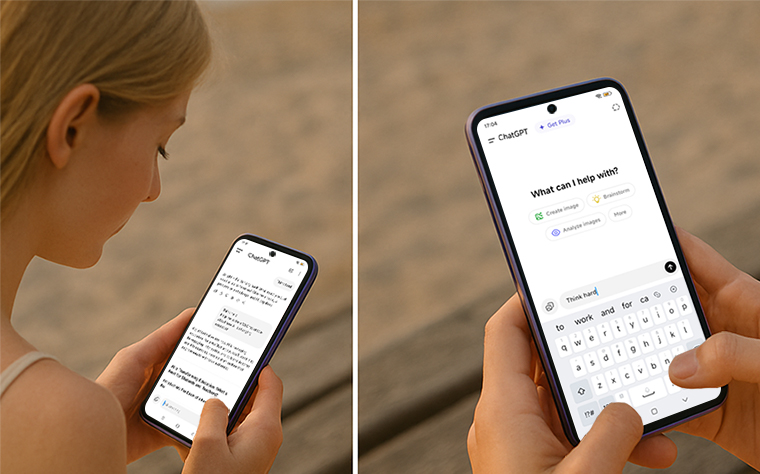
Complex questions can automatically switch to reasoning mode (just type "think hard")
Ranked first in programming benchmarks SWE-Bench, SWE-Lancer, and Aider Polyglot
Multi-round and multi-step tasks are more complete
2. A more realistic conversation experience
Fewer hallucinations (wrong answer)
When faced with questions that they cannot answer, they will admit it directly instead of making it up.
Introducing Safe Completions: Providing safe and useful information in potentially dangerous situations
3. More personalized interactions
Added 4 new personality themes: Cynic (venomous tongue), Robot (rational), Listener (listening), Nerd (scholarly)
You can set colors for different conversation threads
4. Open to all, but with usage restrictions
GPT-5 is available to all ChatGPT users
Free users have a hidden call limit, and will be downgraded to the mini version after exceeding the limit
Developers can use the API to call three specifications: GPT-5, GPT-5 mini, and GPT-5 nano
Beginner's Tutorial: How to Experience GPT-5 for Free?
Step 1: Go to ChatGPT official website ( https://chat.openai.com )
Register or log in with your OpenAI account. GPT-5 is now fully integrated into ChatGPT. Free users can also experience it, but there is a limit on the number of times they can use it (they will automatically downgrade to GPT-5 mini).
Step 2: Open the GPT-5 chat interface
No more manual model selection required, just start a conversation. You can communicate in multiple languages, including Chinese and English, and GPT-5 will automatically recognize and give the most natural responses.
Step 3: Start asking questions or creating
You can start experimenting with GPT-5's powerful capabilities by looking at some common scenarios in daily life and work:
Writing Assistant: Type "Help me write a WeChat article about how AI is changing education," and GPT-5 will quickly generate a draft of the content with a complete structure and clear logic.
Programming helper: Try typing "write a simple to-do app with React," and GPT-5 will directly output executable front-end code and explain the logic of each step.
Learning tool: Enter "summarize Newton's three laws and their applications in table form" and it can help you structure the knowledge points, like an online tutor.
Mock Interview: Looking for a job? Type "Help me simulate a product manager interview Q&A" to get professional and practical questions and answers.
Translation and polishing: Input "Translate this Chinese paragraph into natural and elegant English", and GPT-5 can output authentic expressions that are consistent with the language sense of native English speakers.
Tips:
The free version has a limited daily quota, so it is recommended to use it for important tasks first.
If you want unlimited use of GPT-5, you can upgrade to ChatGPT Plus.
Advanced Tips
Triggering deep reasoning mode with "Think hard"
before the question "Think hard" allows GPT-5 to automatically switch to a more powerful reasoning version.Combine with individual themes
If you want to make GPT-5's answer more interesting, you can start by saying:
From now on, please answer me using your [Nerd/Listener] personality.Ask questions step by step
When long tasks are decomposed into multi-round dialogues, GPT-5 is more stable in maintaining the context of multiple rounds.
Note: GPT-5 is safer, but still needs to be used with caution
OpenAI explicitly states:
GPT-5 is better at admitting tasks it can't complete and responding more honestly. But it can still produce misleading information or "nonsense" in some cases, especially when completing proxy tasks.
Don't blindly trust medical advice
Do not rely on it to complete real financial transactions
Do not attempt to circumvent security restrictions for improper purposes
Future Impact
Altman predicts that GPT-5 will usher in an era of " software on demand ": users input their needs, and AI instantly generates ready-to-run software, which will have a huge impact on the efficiency of developers, entrepreneurs, and businesses.
While GPT-5 doesn't yet possess the ability to continuously learn, it's already very close to achieving artificial general intelligence (AGI).
Summary: It is recommended to use GPT-5 like this
Daily Q&A → Use directly, the response is faster and more accurate
Deep analysis → Add "think hard" command
Code generation → Use natural language to describe requirements and obtain executable projects
Writing and Creation → Combining Characters and Scene Settings
Personalized interaction → Choose the right conversation topic
We recommend using the free credit to experience its writing, programming, and learning capabilities first, then decide whether to upgrade based on your needs.