Recently, Meta (Facebook's parent company) announced that it will further strengthen the protection mechanism for youth accounts on the Instagram platform, adding a series of practical features to reduce potential harassment risks, enhance youth self-protection awareness and ease of operation.
So, what features did Instagram update this time? As a teenager (or parent), how should you use it? This article will help you understand.
What is Instagram's new youth protection feature?
Instagram's updated youth protection features are mainly for users aged 13 to 17, and are designed to improve chat safety, account recommendations, parental supervision, and sensitive content filtering. Specifically, they include:
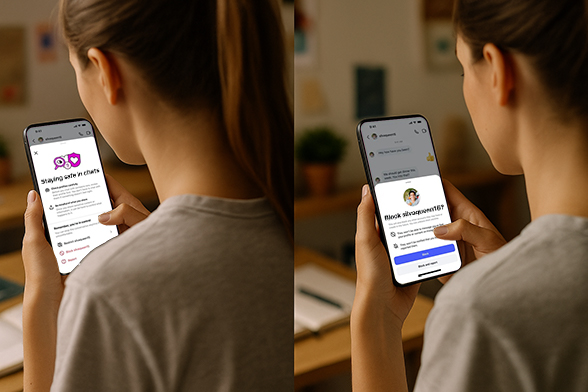
Chat Safety Tips:
Automatic pop-up reminders will appear when you chat with strangers, teaching you how to identify scammers, phishing accounts and inappropriate behavior.One-click blocking and reporting:
Now blocking and reporting can be done together, reducing the number of operation steps and allowing harmful accounts to be dealt with faster.Transparency of stranger account information:
You can directly see the registration time of a stranger's account and determine whether it is a suspicious small account that has just been registered.Youth recommendation protection:
The system will automatically remove youth accounts from the recommendation list of adult strangers to reduce the chance of harassment.Strengthening of parent-managed accounts:
If the account is managed by an adult and is underage (such as a child under 13 years old), the platform will directly block the account and jointly ban any behavior involving sexual innuendo or solicitation of nude photos.
Simply put - make it harder for people who want to harm minors to get close, and make it easier for teenagers to protect themselves.
Quick overview of update highlights
1. Added a new "Safety Tips" pop-up window in private messages
When teenagers chat with strangers, the system will automatically pop up a "Safety Tips" window to remind them to identify suspicious behavior, prevent fraud, and provide a quick link to the help center.
Practical advice: educate teenagers to actively learn "How to Identify Scam Talk by Strangers" when clicking on this prompt.
2. One-click quick block of stranger accounts
In the private message window, users can now directly block suspicious accounts through shortcuts without having to jump through multiple steps, greatly improving the efficiency of dealing with sudden harassment.
How to operate:
Click on the stranger's private message → Click "..." in the upper right corner → Select [Block and Report]
3. Block + report in one step
The "block" and "report" functions that required separate operations in the past have now been merged into a one-step operation, allowing the platform to identify and handle illegal accounts more quickly.
Official explanation:
"We have always encouraged users to block and report violations, and this new approach will simplify the process and make the system more efficient."
4. Strengthen risk screening of parent management accounts
Meta specifically pointed out that 135,000 accounts have been removed this year for using adult accounts to manage children under the age of 13 and sending sexually suggestive comments. Under the new rules, all such accounts will be removed from the recommendation system to reduce the possibility of young people coming into contact with unfamiliar adults.
For Parents:
Try to avoid binding your underage child's account with an adult account
Use Instagram's Parent Monitoring Tool to monitor interactions in real time
5. Teenagers are no longer recommended to "potentially suspicious" adult users
Instagram's system will identify adult users with a history of bad interactions and proactively stop recommending any teenage accounts to them, even if those teenagers are public.
Teenagers & parents must learn: How to enable/use these features?
How to view chat safety tips?
In the private message interface, when you are talking to a stranger, it will pop up automatically. If you don't see it, you can also click "⚙️ Settings" in the upper right corner of the conversation → Find Safety Tips → View the official anti-fraud guide.How to block + report with one click?
Open the chat → click on the other party's avatar → pull down to find the "Block and Report" button.
Check the box to block, select the reason for reporting (such as fraud, harassment, requesting nude photos, etc.) → Submit.
Tips: The more people report, the faster the suspicious account will be blocked.How to check the information of unfamiliar accounts?
Go to the other party's homepage → click "⋯" → view "Account Information" → focus on the registration time. If the registration time is very short + the profile picture is very blurry, it is most likely a phishing account.How do parents manage their children's accounts?
Bind your child's account in the Instagram Parent Center (Family Center) → Set privacy restrictions, view contacts → Keep track of your child's chat dynamics at any time. (You can learn specific operations on the Family Center official website)
Inventory of Instagram's existing youth safety mechanisms
Meta's core youth safety measures that have been deployed on Instagram include:
Location Notice
By June 2025, 1 million people had received the reminder, and 10% clicked for further detailsNude content blur protection
It is enabled by default globally, and 99% of users keep it activated.
More than 40% of blurred images are not manually clicked, and the exposure rate is greatly reduced.Restrict strangers from initiating private messages
Strangers cannot directly contact users under 13 years old, they must first obtain attention
Practical suggestions for parents and young users
Platform protection alone is not enough, family communication and cognitive education are the strongest "firewall". The following are practical suggestions tailored for different roles:
Advice for teenagers (suitable for users aged 13-17)
1. Be cautious when adding friends: Don't easily accept strangers even if they have cute profiles and attractive profiles.
2. Don't avoid uncomfortable content in private messages—block and report it immediately.
3. Do not send your real address, school name, or collection of daily photos.
4. Turn on the blurred nude photo protection, don't be curious and don't click it.
5. If you see your friends being harassed, you can also help them report it. You are not a bystander.
Remember one thing: It is better to be rejected once more than to take one more risk.
Advice for parents
1. Take the initiative to talk to your children about "what are network boundaries" instead of simply controlling them.
2. Turn on Instagram's parental supervision feature: you can set usage time and manage the people you follow.
3. Check in with your child regularly to see if they are experiencing any interactions with strangers (especially those that are sexually suggestive).
4. It is more important to teach children how to "identify harassment" and "dare to say no" than to ban their accounts.
5. Work together to develop a "social usage convention" instead of simply prohibiting it and build a trusting relationship.
Path Tips:
Settings → Parental Supervision → Add Supervisor (can be set as parent account)
Why is this update so critical?
Meta revealed that more than 135,000 Instagram accounts for inappropriate behavior against children were banned in early 2024, most of which were from adult managed accounts. This shows that:
Teens face real and ongoing risks to their social safety, especially in private messaging and recommendation algorithms.
In addition, Meta also stated:
The "nude photo blurring" feature launched globally has covered most teenage users;
More than 40% of the blurred images in private messages were not clicked, effectively reducing the risk of exposure;
The newly launched "location reminder function" reached one million exposures in the first month of its launch, and 1/10 of users took the initiative to learn more about protective measures.
Meta supports raising the minimum age for using social platforms
Currently, several EU member states are pushing to raise the legal age for using social platforms to 15 or even 16. Meta publicly expressed support for this proposal.
This is seen by the outside world as:
Respond strategically to public opinion and regulatory pressure;
This will reduce the platform's legal liability and risk exposure;
At the same time, it sends a signal of stricter safety protection for underage users.
Conclusion
Instagram's continuous upgrades in youth protection show that the platform itself is aware of its heavy responsibility. However, the most effective protection is always inseparable from:
Platform Mechanism
Parental supervision
Self-protection awareness among teenagers
Do you support raising the age threshold for social platforms?