Meta recently launched a series of new audience insights and interaction data features for Threads, further strengthening the platform's content analysis capabilities and providing creators with deeper content performance tracking and audience portrait analysis.
This article will give you a comprehensive understanding of the highlights of Threads' latest Insights features, and will include practical tutorials to help you use these tools well and efficiently expand your influence.
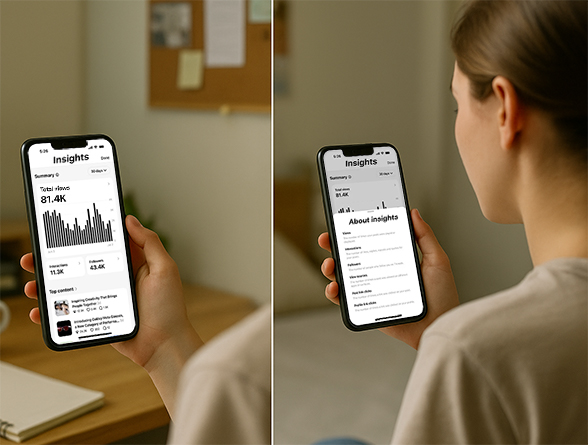
What is Threads' new audience insights feature?
Simply put, Threads' Audience Insights is a visual data panel that records the entire process of each of your posts from being seen → being interacted with → being forwarded, and adds audience source, geographic location, and demographic information.
With this function, you can know more intuitively:
Where your audience is primarily from (city, country)
Age and gender of the audience
How the post was discovered (Threads recommendation, Instagram, Facebook, etc.)
Specific interaction details for each piece of content (likes, replies, quotes, and reposts)
This is much more useful than simply showing "how many people watched it". For creators, it is like having an additional "content checkup form" that allows them to find areas for improvement at any time.
Update highlights at a glance
Meta means:
"We're improving Threads Insights to make it easier for creators to see how their posts are performing and understand how their content is being discovered."
This update covers multiple key analysis dimensions. Here are the new capabilities you need to focus on:
1. More detailed interactive disassembly
Now click on the "Interactions" area and you can see that the interactions are further categorized into:
Likes
Replies
Reposts
Quotes
Suitable for reviewing content effectiveness and understanding which type of content is most likely to spark discussion.
2. Audience region + crowd portrait upgrade
By clicking on the "Followers" area, you will get geographic and demographic data of your followers, including:
Popular cities and countries distribution
Age range
Gender ratio
It is very suitable for brand owners and creators to analyze the target user group portrait and optimize the release time and content style.
3. Added interactive trend chart + source tracking
Trend chart: You can view the changes in the views and interactions of the content over time.
View Sources: Know clearly through which entrances the content is viewed, such as:
1. Threads Internal Recommendation
2. Instagram Recommended Page
3. Facebook News Feed
This allows you to evaluate cross-platform exposure results and focus on optimizing content recommendation weight.
Practical tutorial: How to view your Threads insight data?
Mobile operation:
1. Open the Threads app.
2. Go to your personal homepage;
3. Click the chart icon in the upper left corner;
4. View detailed insights panels for content;
5. Click any data item (such as Interactions, Followers, etc.) to expand it to more detailed information.
Web page operation:
1. Open the Threads web version;
2. Click the menu in the lower left corner;
3. Or visit the Insights page directly;
4. After entering, view the performance details and source tracking of each post.
How can creators use this data to optimize their content strategies?
Review your popular posts every week
Which types of posts are more likely to be cited vs retweeted?
Which content is more popular in different countries/cities?
Release time optimization:
Find out when your audience is most active by viewing the Browsing Trends graph.
Focus on browsing source channels
Are you discovered through search or driven by recommendation algorithms?
Which platform (Instagram/Facebook) brings the most exposure?
Adjust content strategy based on audience profile
Are there many female viewers? Can it be more lifelike?
Many young users? Suitable for adding jokes and using a light tone
Are cities concentrated? Consider matching local hot topics, festivals, and topics
Why does this matter to creators?
As Threads integrates more with Instagram and Facebook, the quality content you post on Threads will have the opportunity to appear in the recommendation streams of users on other platforms through recommendation algorithms. This means:
Your content may far exceed the traffic pool of Threads itself, bringing you the opportunity to "overtake on the curve" exposure!
With this updated audience analysis and source tracking features, creators can:
Identify which types of content are more likely to be recommended across platforms
Track the effectiveness of recommendation channels and adjust content delivery strategies
Analyze the interests and preferences of different groups of people and develop differentiated content plans
What practical benefits does the new features of Threads bring?
Threads content can now also be recommended to Instagram and Facebook.
In other words, a post you make may be seen by thousands of users from other platforms! This is a rare free traffic opportunity for creators who want to quickly increase their followers.
In addition, Meta also provides detailed explanations of each indicator to help you understand the meaning of each data and avoid problems such as "not being able to understand" or "not being able to use it well".
Summary
The upgrade of Threads' insight function indicates that Meta is continuing to build a platform environment with more "content professionalism". For creators, this is a key opportunity to understand the audience, optimize strategies, and expand influence.
Have you started using Threads Insights?



