Recently, Meta has once again accelerated its commercialization layout for WhatsApp. After the advertising plan was shelved due to user privacy concerns in the early years, WhatsApp has now quietly launched the "Status Ads" and "Channel Promotion/Subscription" features, and started testing in some regions. With the support of more than 2 billion active users worldwide, this change is seen as a key step for WhatsApp to monetize.
So, what does this mean for ordinary users, brands, content creators, and even you and me? How do we use these new features? Will it affect the privacy of our chats?
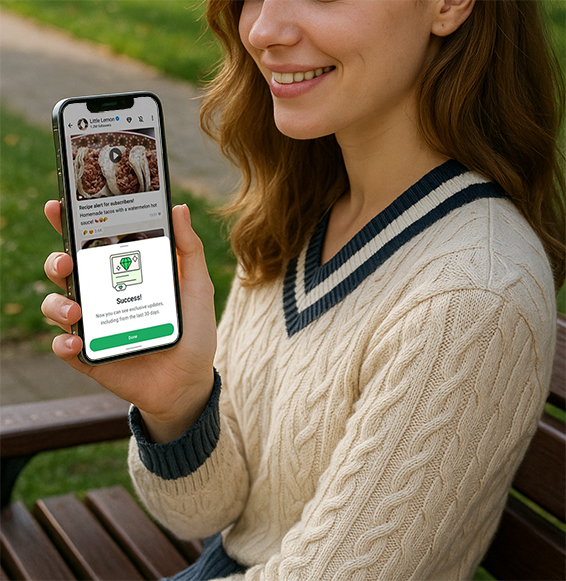
Overview of new features: Status ads + channel subscriptions
1. Status Ads
When you browse your friend's WhatsApp status (24-hour dynamics), you will see advertising content placed by brands, usually displayed in the form of pictures/videos. After clicking, you can:
Open the chat window directly to communicate with the merchant
Jump to the brand's official website or e-commerce link
View product detail pages, coupons, and more
Advertising content source:
Business accounts use Meta Ads Manager to place ads
The system makes lightweight recommendations based on your country, language, channels you follow, etc.
WhatsApp Official interpretation:
"You can discover new businesses through status ads and immediately start a conversation with them about their products or services."
2. Promoted Channels + Subscriptions
WhatsApp launched the "channel feature" last year, which is rapidly evolving into a platform for brands and creators. Now, the official launch of two new features:
Promoted Channels:
Brands can pay to have their channels given priority exposure on the "Channel Recommendation Page", similar to IG's "Recommended Accounts".
Channel Subscriptions:
Some channels have started paid subscriptions, where users pay a certain fee every month to unlock exclusive content, discounts or interactive privileges. This is especially attractive to KOLs, brand owners and community channels.
Practical Tutorial: How Can Creators Quickly Use These New Features?
Although the advertising and subscription functions are currently only being tested in some markets, if you are a merchant or content creator, you can start preparing and laying out directions in advance right now:
1. Open and operate a WhatsApp Business account immediately
WhatsApp Business is the official tool for businesses to use WhatsApp. It can be used to create business profile pages, set up automatic replies, manage customers with tags, etc.
Instructions:
Download WhatsApp Business on the App Store / Google Play
Set up company information (introduction, address, contact information, etc.)
Upload product images and service information to build a credible image
Improve efficiency by using automated features such as "Quick Reply" and "Greetings"
2. Learn to create high-conversion status ad content
Although the official ad placement is still controlled by Meta, you can use your own status function to practice publishing ad content.
Content suggestions:
Use vertical videos or animated images to convey the core selling point (similar to Reels)
Add a CTA (e.g. "Click to contact me", "Limited time discount")
The publishing frequency is controlled to 1-2 pieces per day to avoid user fatigue
Observe the number of views and optimize the cover and content structure
3. Create your WhatsApp Channel to seize the private domain traffic entrance
Opening your own channel allows users to receive updated content first, which is more stable and efficient than social platforms.
Who is it suitable for?
Brand: release new product updates and event announcements
KOL/KOC: share valuable content and operate fan communities
Educators/bloggers: Building a knowledge subscription model
Channel management suggestions:
Fixed weekly update frequency (e.g., one issue is released every Wednesday)
Content may include text, audio, and video
Use tools such as questionnaires/paid subscriptions to increase user engagement
Will user privacy be affected?
Meta clearly stated:
"We will not read WhatsApp private chat content for ad targeting."
Ads are mainly displayed based on the following information:
Country/City
System language
Channels followed by users
Behavior of interacting with the ad (such as clicking, staying)
At the same time, if you add WhatsApp to the "Meta Account Center", the system may also use your interest preferences on Facebook or Instagram to improve advertising relevance.
This means - your private chats will not be read, and voice calls or media files will not be tracked.
How should users manage these ads?
How to turn off personalized ads:
1. Go to WhatsApp Settings > Privacy > Ad Preferences;
2. You can choose to turn off ad personalization;
3. You can also sign out of Accounts Center to prevent cross-platform data sharing.
Why is the new feature of this WhatsApp update worth paying attention to?
WhatsApp has not been able to find a large-scale profit model since it was acquired by Meta for $19 billion in 2014. As a product that focuses on "end-to-end encryption" and private communication, users are particularly sensitive to advertisements.
Meta tried to embed ads in the status bar in 2018, but abandoned it due to user privacy concerns. Now, the plan is back, but with obvious changes:
Only insert ads in Status, do not touch private chat content
Natural transition between ads and friend status, similar to Instagram Stories ads
Rely on "limited information" such as city/language/channel interaction for targeting, and do not read chat history
This approach not only preserves users' trust in privacy, but also creates a new entry point for brands.
Conclusion
This isn't the first time WhatsApp has tried advertising, but it may be the first time it's really ready to do it. For brands, this means:
New traffic entrance;
More user reach scenarios;
It is possible to have more private and high-frequency connections with fans.
For users, this wave of advertisements is not too disturbing as long as they do not enter the chat page.
Would you accept seeing ads while refreshing your status? Would you follow brand channels or consider paying for premium content?